Best Smart Displays 2026: Echo Show 8 vs Nest Hub vs Show 15
A smart display is a voice assistant with a screen — it shows you recipes, video calls, security cameras, and your calendar instead of just talking. The first decision isn't the size, it's the assistant: Alexa or Google, because that choice locks in your whole smart-home experience.
We compared each smart display on assistant ecosystem (Alexa vs Google) and smart-home breadth, screen size and placement, camera and privacy, sound quality, video calling and photo-frame use, and price. Displays were assessed against owner reviews, weighting matching the assistant to the user's ecosystem and the size and features to their main use.
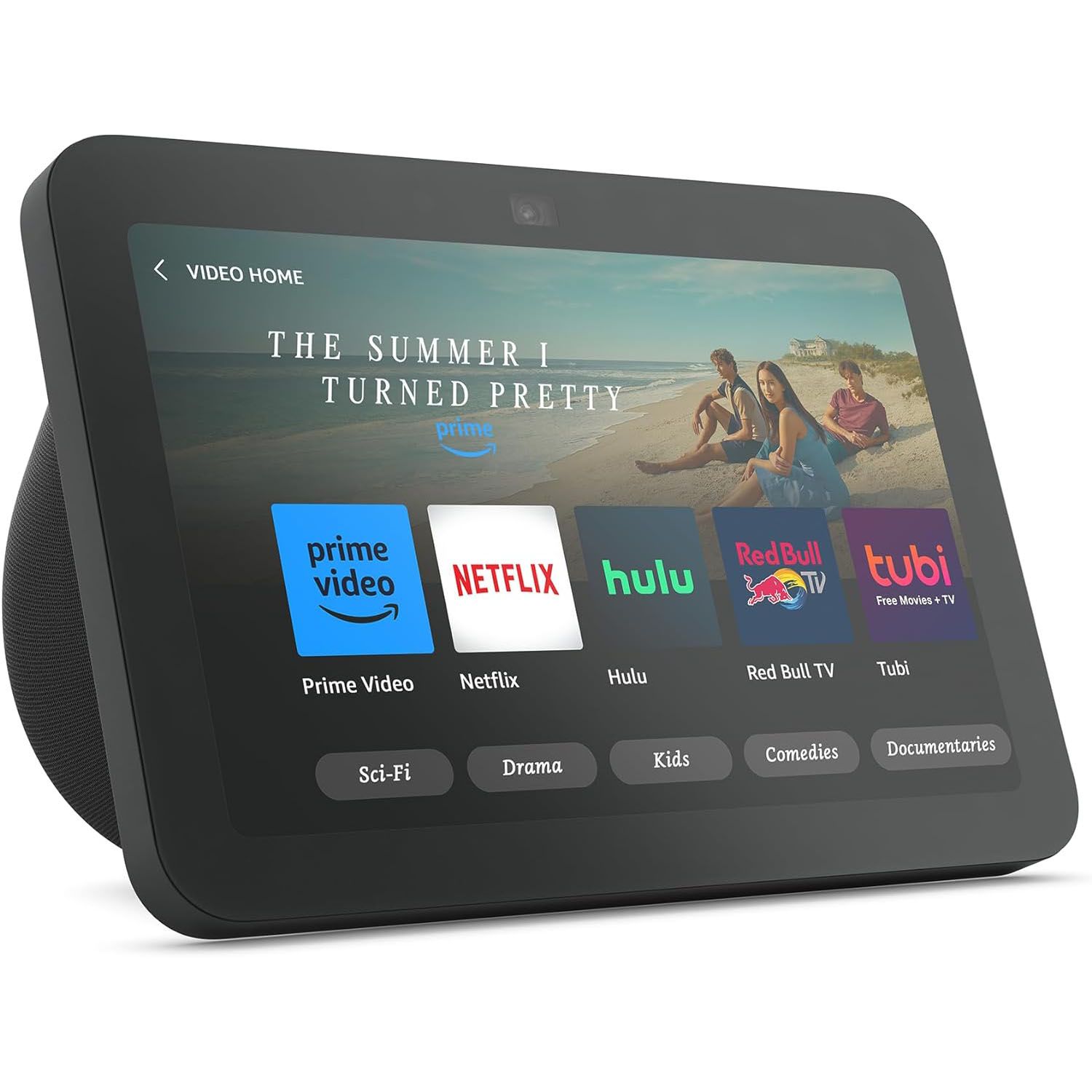
Amazon Echo Show 8
Best Overall: The Amazon Echo Show 8 hits the sweet spot of screen size, sound, features, and price in the dominant Alexa ecosystem. The 8-inch screen is big enough to genuinely use — following recipes, watching video, seeing a video call or camera feed, glancing at the calendar and weather — without being too large for a counter, nightstand, or desk.
Top picks ↓Top picks
Related articles
Amazon Echo Show 8
The best overall — the sweet-spot 8-inch Alexa display with notably good stereo sound, a camera (with privacy shutter) for video calls, and the largest smart-home ecosystem, at a reasonable price. Versatile for recipes, calls, media, and smart-home control; ties you to Alexa/Amazon and shows some promos, but the do-everything benchmark.
The Amazon Echo Show 8 hits the sweet spot of screen size, sound, features, and price in the dominant Alexa ecosystem. The 8-inch screen is big enough to genuinely use — following recipes, watching video, seeing a video call or camera feed, glancing at the calendar and weather — without being too large for a counter, nightstand, or desk. It has notably good stereo sound for its size (better than the Show 5 and Nest Hub), a camera with a physical privacy shutter for video calls, and full Alexa for voice, smart-home control, timers, music, and the vast Alexa device ecosystem. It's the well-rounded do-everything display at a reasonable price, with Alexa's widest smart-home support. It ties you to Alexa/Amazon (awkward with YouTube/Google), the screen and processing are good-not-premium, and it shows some promos, but for useful size, good sound, video calling, smart-home breadth, and value, it's the one most people should buy.
Pros
- ✓Versatile 8-inch screen — recipes, video, calls, glanceable info
- ✓Notably good stereo sound for its size
- ✓Camera with privacy shutter; largest smart-home ecosystem
- ✓Well-rounded at a reasonable price
Cons
- ✗Ties you to Alexa/Amazon; awkward with YouTube/Google
- ✗Shows some promotional content

Google Nest Hub 2nd Gen
The best for Google — a compact Assistant display that excels at question-answering, Google services, YouTube, and as a Google Photos frame, with Sleep Sensing for nightstands and no camera (a privacy plus, but no video calls). The pick for Google-ecosystem users; smaller screen and modest sound than the Show 8.
The Google Nest Hub (2nd gen) is the best pick for Google-ecosystem users and those who prefer Google Assistant. This compact (~7-inch) display runs Assistant — often better than Alexa at general and web questions (via Google search) and at integrating Google services (Calendar, Photos, Maps, and YouTube natively, unlike Amazon devices). It excels as a Google Photos frame, a kitchen helper, and a Google Home/Nest smart-home controller, and the 2nd-gen adds radar Sleep Sensing for a nightstand. It has no camera — a privacy plus for the bedroom, but no video calls. It's the choice for Google users, YouTube and Google services, and anyone who prefers Assistant's answers. The smaller screen and modest sound versus the Show 8, and the lack of a camera for calls, are the trade-offs, but within the Google world it's the standout.
Pros
- ✓Superior question-answering and Google services (native YouTube)
- ✓Excellent Google Photos frame; Sleep Sensing for nightstands
- ✓No camera — a bedroom privacy plus
- ✓Great Google Home/Nest smart-home control
Cons
- ✗Smaller screen and modest sound than the Show 8
- ✗No camera means no video calls

Amazon Echo Show 5
The budget/compact pick — a small, cheap Alexa display ideal as a bedside smart clock or compact kitchen/desk helper, with a camera (privacy shutter), smart-home control, and all the Show features in a tiny package. Small screen and modest sound limit media, but the value standout for a secondary or nightstand display.
The Amazon Echo Show 5 is the budget and compact pick — a small (~5.5-inch) Alexa display at a low price, ideal as a smart alarm clock on a nightstand, a compact kitchen helper, or an affordable entry into smart displays. It does everything a Show does — Alexa voice, smart-home control, timers, weather, video calls (camera with privacy shutter), and music — in a tiny, cheap package, and it's especially popular as a bedside smart clock with sunrise alarms and bedroom control. The small screen and modest sound limit it for media and recipe-following versus the Show 8, but for a compact, affordable Alexa display for a nightstand, small kitchen, or desk, it's the value standout — the choice for a cheap, small, or secondary smart display rather than a primary one.
Pros
- ✓Cheap and compact — ideal nightstand smart clock
- ✓Full Alexa features, camera with privacy shutter
- ✓Smart-home control, timers, calls in a tiny package
- ✓Great affordable entry or secondary display
Cons
- ✗Small screen and modest sound limit media/recipes
- ✗Not a primary do-everything display

Google Nest Hub Max
The premium Google pick — a larger 10-inch Nest Hub with room-filling sound and a camera for Google video calls, Nest Cam monitoring, and face personalisation. The capable Google counter display for those wanting a bigger screen, good sound, and a camera; pricier and sizeable.
The Google Nest Hub Max is the premium, larger Google smart display for a bigger screen, better sound, and a camera in the Google ecosystem. Its 10-inch screen is good for YouTube and video, recipes, and rich displays, the sound is notably better and room-filling (doubling as a capable music speaker), and the camera enables Google video calls plus Nest Cam home monitoring and face-recognition personalisation. It's the Google answer to a larger Echo Show — the choice for Google-ecosystem users wanting a more capable display with sound and a camera. The higher price than the small Nest Hub and its sizeable footprint are the trade-offs, but for a premium Google smart display with a big screen, good sound, and camera features, it's the standout, combining Assistant's strengths with hardware to match the larger Echo Shows.
Pros
- ✓Larger 10-inch screen with room-filling sound
- ✓Camera for Google video calls and Nest Cam monitoring
- ✓Google Assistant strengths and services
- ✓Capable music speaker and photo frame
Cons
- ✗Pricier than the small Nest Hub
- ✗Sizeable for a counter

Amazon Echo Show 15
The family-hub pick — a large 15.6-inch wall-mountable Alexa display as a central command centre showing the family calendar, lists, notes, photos, widgets, and smart-home controls at a glance, with Fire TV capability. Large and ideally wall-mounted with modest sound, but unique here as a shared family organisation display.
The Amazon Echo Show 15 is the large, wall-mountable smart display designed as a family hub and central organiser, not a counter device. Its big 15.6-inch screen is meant to be wall-mounted (or stood) in a kitchen or family area like a digital command centre, showing a full family calendar, shared shopping lists, sticky notes, reminders, photos, widgets, and smart-home controls at a glance for the whole household, plus video, calls, and camera feeds, and it runs Alexa and can act as a Fire TV with the remote. It's the choice for a family wanting a large, central, wall-mounted organisational hub rather than a small personal assistant. It's large and ideally wall-mounted (a more involved setup), the sound is modest for its size, and it's overkill as a simple voice assistant — but as a family command-centre display, it's unique here and the standout for that role.
Pros
- ✓Large 15.6-inch wall-mountable family command centre
- ✓Shows calendar, lists, notes, photos, and controls at a glance
- ✓Video, calls, camera feeds, and Fire TV capability
- ✓Unique shared household-organisation role
Cons
- ✗Large and ideally wall-mounted (more setup)
- ✗Modest sound; overkill as a simple assistant
Which one is right for you?
For a versatile do-everything display
Amazon Echo Show 8
The sweet-spot 8-inch size, good sound, a camera for calls, and Alexa's widest smart-home ecosystem make it the well-rounded benchmark for kitchen, calls, media, and control.
For Google ecosystem users
Google Nest Hub 2nd Gen
Superior question-answering, native Google services and YouTube, a great photo frame, and camera-free bedroom privacy make it the Google pick.
For a nightstand or cheap secondary display
Amazon Echo Show 5
A small, affordable Alexa display with full features and a camera is ideal as a bedside smart clock or compact kitchen/desk helper.
For a larger Google display with sound and camera
Google Nest Hub Max
A 10-inch screen, room-filling sound, and a camera for video calls and Nest monitoring make it the premium, capable Google counter display.
For a family organisation hub
Amazon Echo Show 15
A large wall-mounted screen showing the shared calendar, lists, notes, and smart-home controls at a glance makes it the household command centre.
Top pick: Amazon Echo Show 8
The Amazon Echo Show 8 is the best smart display for most people because it hits the sweet spot of screen size, sound quality, features, and price in the dominant Alexa ecosystem. The 8-inch screen is big enough to genuinely use — following a recipe, watching a video, seeing a video call or a camera feed, glancing at your calendar and the weather — without being too large for a kitchen counter, nightstand, or desk. It has notably good stereo sound for its size (better than the smaller Show 5 and Google's Nest Hub), a camera for video calls (with a physical privacy shutter), and full Alexa for voice control, smart-home command, timers, music, and the vast Alexa skills and device ecosystem.
Its appeal is being the well-rounded, do-everything smart display at a reasonable price: the 8-inch size is the most versatile (useful screen, manageable footprint), the sound is good enough to double as a capable music speaker, the camera enables video calls and home monitoring, and Alexa's huge ecosystem means it works with the widest range of smart-home devices and services. For someone who wants one smart display that handles the kitchen, video calls, smart-home control, and media well, in the most popular assistant ecosystem, it's the benchmark.
The honest caveats: it ties you to Alexa and Amazon's ecosystem (a downside if you prefer Google or want YouTube, which is awkward on Amazon devices), the screen and processing are good-not-premium, and Amazon's displays show some promotional content. But for the best balance of useful screen size, good sound, video calling, smart-home breadth, and value in the leading ecosystem, the Echo Show 8 is the one most people should buy.
Best for Google and the budget pick: Google Nest Hub and Echo Show 5
The Google Nest Hub (2nd gen) is the best pick for Google ecosystem users and those who prefer Google Assistant. It's a compact smart display (around 7 inches) with Google Assistant — which many find better than Alexa at answering general questions and web queries (drawing on Google's search) and at integrating with Google services (Calendar, Photos, Maps, YouTube, which works natively here unlike on Amazon devices). It excels as a digital photo frame (beautifully displaying Google Photos), a kitchen helper, and a smart-home controller for Google Home/Nest devices, and the 2nd-gen model adds Sleep Sensing (using radar to track your sleep without a wearable) if placed on a nightstand. It has no camera (a plus for privacy-conscious bedroom use, a minus if you want video calls). It's the choice for Google-ecosystem users, those who want YouTube and Google services, and anyone who prefers Assistant's question-answering. The trade-offs are the smaller screen and modest sound versus the Echo Show 8, and no camera for video calls.
The Amazon Echo Show 5 is the budget and compact pick — a small (around 5.5-inch) Alexa smart display at a low price, ideal as a smart alarm clock on a nightstand, a compact kitchen helper, or an affordable entry into smart displays. It does everything a Show does — Alexa voice control, smart-home command, timers, weather, video calls (it has a camera with a privacy shutter), and music — in a tiny, cheap package, and it's especially popular as a bedside smart clock (showing the time, sunrise alarms, and controlling the bedroom). The small screen and modest sound limit it for media and recipe-following compared to the Show 8, but for a compact, affordable Alexa display for a nightstand, small kitchen, or desk, it's the value standout. It's the choice for someone who wants a cheap, small smart display rather than a primary one.
Choose between them by ecosystem and use. The Google Nest Hub wins for Google Assistant users, YouTube/Google services, photo-frame use, and camera-free bedroom privacy. The Echo Show 5 wins as a cheap, compact Alexa display for a nightstand or small space. The Nest Hub is the Google pick; the Show 5 the budget compact pick.
The premium Google and the wall-mount: Nest Hub Max and Echo Show 15
The Google Nest Hub Max is the premium, larger Google smart display for someone who wants a bigger screen, better sound, and a camera in the Google ecosystem. It has a 10-inch screen (good for watching YouTube and video, following recipes, and richer displays), notably better, room-filling sound than the small Nest Hub (it doubles as a capable music speaker), and a camera that enables Google Duo/Meet video calls plus features like Nest Cam home monitoring and face-recognition personalisation. It's the choice for Google-ecosystem users who want a larger, more capable display with sound and a camera — essentially the Google answer to a larger Echo Show. The trade-offs are the higher price than the small Nest Hub and that it's a sizeable device for a counter, but for a premium Google smart display with a big screen, good sound, and camera features, it's the standout.
The Amazon Echo Show 15 is the large, wall-mountable smart display designed as a family hub and central organiser, not a counter device. It's a big 15.6-inch screen meant to be wall-mounted (or stood) in a kitchen or family area like a digital command centre, showing a full family calendar, shared shopping lists, sticky notes, reminders, photos, widgets, and smart-home controls at a glance for the whole household, plus video, calls, and camera feeds. It runs Alexa and can act as a Fire TV with the remote. It's the choice for a family that wants a large, central, wall-mounted organisational hub and shared display, rather than a small personal assistant. The trade-offs: it's large and ideally wall-mounted (a more involved setup), the sound is modest for its size, and it's overkill as a simple voice assistant — but as a family command-centre display, it's unique here and the standout for that role.
Choose between them by role. The Nest Hub Max wins as a premium larger Google display with sound and camera. The Echo Show 15 wins as a large wall-mounted family organisation hub. The Nest Hub Max is the capable Google counter display; the Show 15 the family command-centre wall display.
How to choose: assistant ecosystem, screen size, camera, and sound
Choose the assistant ecosystem first, because it determines everything else. Alexa (Echo Show devices) has the largest smart-home ecosystem (works with the widest range of devices and has the most skills), a huge Amazon-services integration, and the broadest range of display sizes — but it's weaker at general question-answering than Google and awkward with YouTube/Google services. Google Assistant (Nest Hub devices) is generally better at answering general and web questions (leveraging Google search), integrates beautifully with Google services (Calendar, Photos, Maps, YouTube natively), and excels as a photo frame — but has a smaller (still large) smart-home ecosystem and fewer display sizes. Match the assistant to the one you already use and the smart-home devices and services you own: if you're in Amazon's world or want the widest device support, choose Alexa/Echo Show; if you use Google services, want YouTube, or prefer Assistant's answers, choose Google/Nest Hub.
Match screen size and placement to how you'll use it. Compact displays (5-7 inch: Echo Show 5, Nest Hub) suit a nightstand (smart clock, sleep tracking), a small kitchen counter, or a desk — great for glanceable info, timers, and assistant tasks, but small for video and recipes. Mid-size (8-10 inch: Echo Show 8, Nest Hub Max) is the versatile sweet spot — big enough for recipes, video, calls, and rich displays while fitting most counters and nightstands. Large/wall-mount (15 inch: Echo Show 15) is for a central family hub showing calendars and organisation for the household, mounted on a wall, not a personal assistant. Decide where it'll live and whether you want a glanceable bedside/desk device (compact), a versatile kitchen/living display (mid-size), or a family command centre (large/wall).
Weigh camera, sound, and privacy for your needs. A camera enables video calls and home monitoring (Echo Show 8/5/15, Nest Hub Max have cameras with privacy shutters on the Amazon devices), which is valuable if you video-call family or want to check in on home/pets — but if you want a camera-free device for privacy (especially in a bedroom), the Google Nest Hub (no camera) is the pick. Sound quality varies a lot: larger displays (Echo Show 8, Nest Hub Max) have notably better, room-filling sound that doubles as a capable music speaker, while compact ones (Show 5, small Nest Hub) have modest sound fine for voice and casual listening but not a primary speaker. Also weigh whether you want it to double as a photo frame (Nest Hub excels) or a media screen (mid-to-large with good sound and YouTube/Prime access). Buy for the assistant ecosystem you use, the screen size and placement that fit your main use, with a camera if you want video calls (or none for bedroom privacy), and good sound if it'll double as a speaker.