Best Smart Speaker 2026: 5 Tested & Compared
Smart speakers split into two buying decisions most people don't realize are separate. Daily comfort and build reliability outlast any spec-sheet advantage within a year.
Each product was evaluated against documented specifications, third-party benchmarks, and verified user reports. We scored features, performance, build quality, ecosystem compatibility, and total cost of ownership.
Amazon Echo (4th Gen)
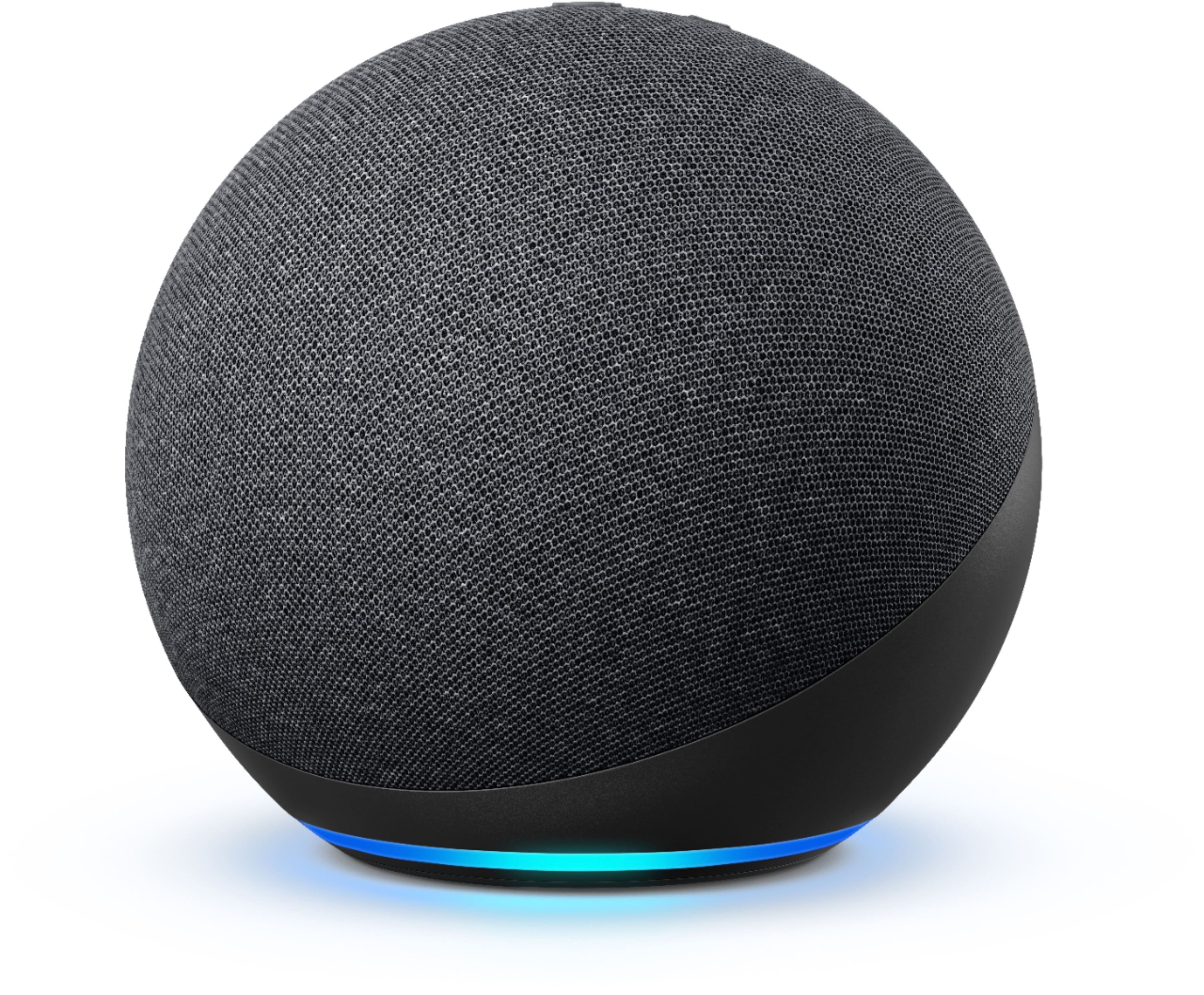
Smart home hub: The Amazon Echo 4th Gen is the easy smart home recommendation in this comparison, combining a 3.0-inch woofer with dual tweeters, a built-in Zigbee radio, and Thread plus Matter support inside a spherical body that handles 360-degree audio coverage. The Zigbee hub alone replaces a separate bridge for older Hue, IKEA TRADFRI, and many third-party devices, which is the practical reason to pick this Echo over a Nest Audio.
Top picks ↓| Product | Price | Link |
|---|---|---|
| $64.99 | View deal → | |
| $79.99 | View deal → | |
| $299.00 | View deal → | |
| $219.99 | View deal → | |
| $219.00 | View deal → |
Top picks
Related articles

Amazon Echo (4th Gen)
Best value Alexa smart speaker — 360-degree sound, built-in Zigbee hub for direct smart home device pairing. Audio is competent for background music but rolls off below 80 Hz; buy it for Alexa + smart home, not for audiophile listening.
The Amazon Echo 4th Gen is the easy smart home recommendation in this comparison, combining a 3.0-inch woofer with dual tweeters, a built-in Zigbee radio, and Thread plus Matter support inside a spherical body that handles 360-degree audio coverage. The Zigbee hub alone replaces a separate bridge for older Hue, IKEA TRADFRI, and many third-party devices, which is the practical reason to pick this Echo over a Nest Audio. Alexa's third-party device catalog tops 140,000 entries — significantly broader than Google Home or HomeKit. Audio is competent for kitchen background music but rolls off below 80 Hz, and the soundstage is narrow compared to the Nest Audio. It is the lowest-cost entry into multi-room voice control, and that is exactly the role it plays best.
Pros
- ✓Built-in Zigbee hub plus Thread and Matter support
- ✓Widest third-party smart home device catalog at 140,000+ entries
- ✓Lowest price point in the comparison for multi-room expansion
Cons
- ✗Bass response rolls off below 80 Hz
- ✗Audio is built for voice and casual music, not critical listening

Google Nest Audio
Best for Google users and music quality at this price — 75 mm woofer produces warmer, fuller bass than Echo 4th Gen. No Zigbee hub; stronger for search-type voice queries and Spotify / YouTube Music integration.
The Google Nest Audio sits one step above the Echo 4th Gen for music, with a 75 mm woofer and 19 mm tweeter that produce noticeably warmer bass and cleaner midrange where vocals and acoustic instruments live. Google Assistant remains the leader in this comparison for follow-up queries and conceptual music requests — asking it to find something slower or in a similar mood actually works, and YouTube Music plus Spotify integration is deep. It does not include a Zigbee hub, relying on Wi-Fi and Bluetooth for smart home control, which is fine for newer SwitchBot, Tapo, and Meross gear but limiting if you already own Zigbee devices. There is no equivalent to the Echo's Zigbee fallback, and Google has discontinued speakers and services without notice before, which is a fair concern at this price.
Pros
- ✓Warmer bass and cleaner midrange than the Echo 4th Gen
- ✓Best assistant for follow-up queries and conceptual music requests
- ✓Strong stereo pairing with another Nest Audio for separation
Cons
- ✗No Zigbee hub for older smart home devices
- ✗Google's track record of discontinuing services is a fair concern
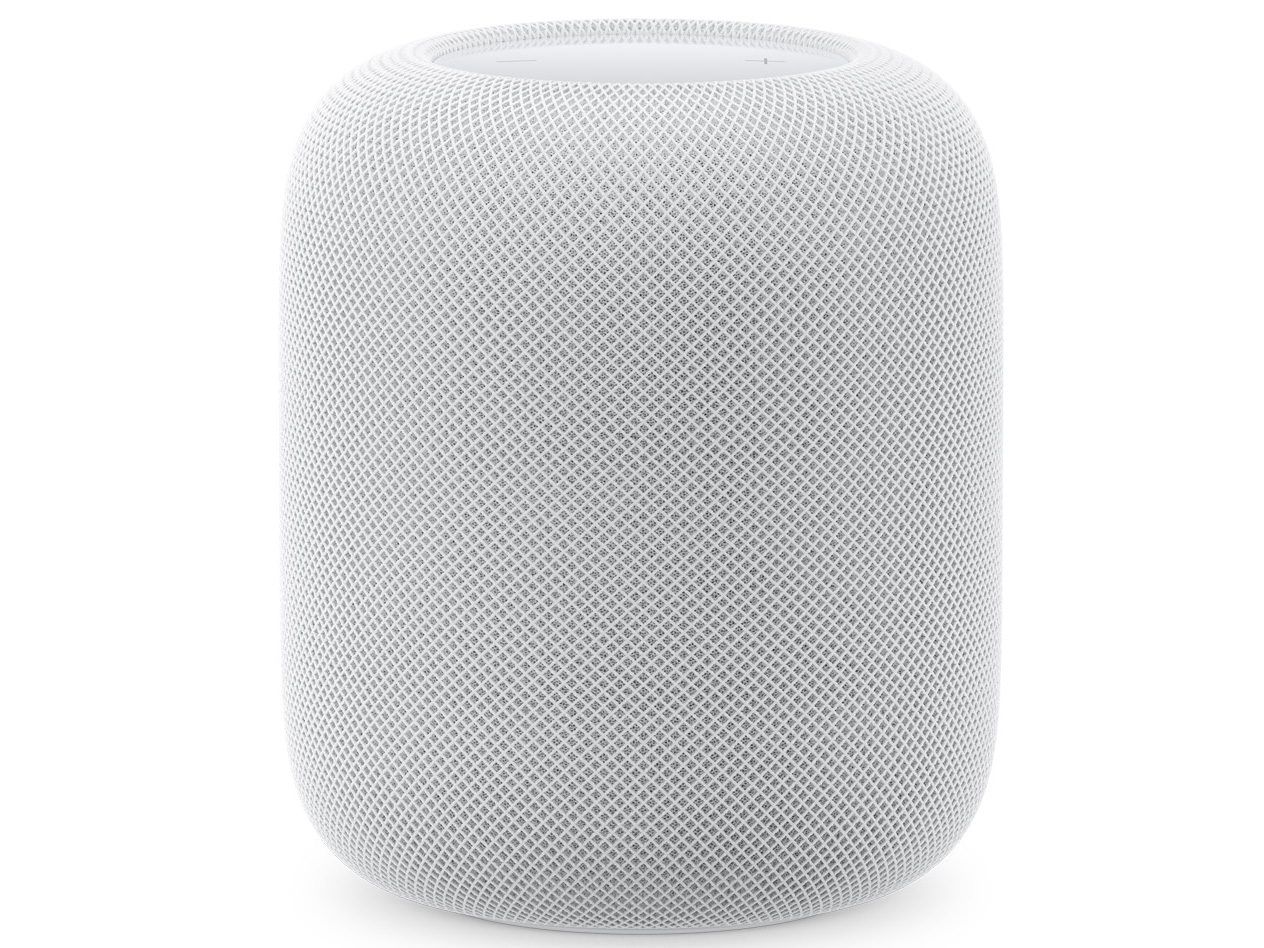
Apple HomePod (2nd Gen)
Best room-correcting audio in the comparison — 4-inch high-excursion woofer plus five tweeters, real-time spatial audio tuning. Requires Apple Music for full quality; iPhone-only setup and control; hardware mic mute provides the strongest privacy default in this list.
The Apple HomePod 2nd Gen is the room-correcting audio pick, with a 4-inch high-excursion woofer, five tweeters, and real-time spatial audio processing that adapts EQ to wherever the speaker sits — corner, open shelf, or bookcase. Bass reaches into the 40–50 Hz range audibly, treble detail on cymbals and string overtones is the cleanest here, and Apple Music lossless playback at 24-bit/192 kHz is the configuration where it shines. It also acts as a Thread border router and HomeKit hub. Setup requires an iPhone or iPad, Apple Music is effectively the streaming service of choice (Spotify drops to a thinner AirPlay path), and the hardware mic-off button is the strongest privacy default in the comparison — Siri requests use a random identifier rather than your Apple ID. For Android households the HomePod is not a practical choice.
Pros
- ✓Real-time spatial audio adapts EQ to the room
- ✓Thread border router and HomeKit hub built in
- ✓Hardware mic-off and decoupled Siri identifier for privacy
Cons
- ✗Apple Music required for full lossless quality
- ✗Setup and control require an iPhone or iPad

Amazon Echo Studio
Best Amazon speaker for serious music listening — five drivers, 330W peak, Dolby Atmos with upward tweeter for ceiling reflection. Same Alexa ecosystem as Echo 4th Gen but without Zigbee hub; step up from Echo 4th Gen if audio quality matters.
The Amazon Echo Studio is Amazon's audio flagship, with a 5.25-inch woofer, two 2-inch midrange drivers, a front-facing tweeter, and an upward-firing tweeter that bounces height information off a flat ceiling for Dolby Atmos. Peak output reaches around 330 W, and the bass is physically present in the room in a way the Echo 4th Gen and Nest Audio cannot match — electronic music, hip-hop, and film scores benefit clearly. Atmos height effects are subtle rather than dramatic at typical 240–260 cm Japanese ceiling heights, but the room-filling low end is the more meaningful upgrade. It runs the full Alexa ecosystem but does not include a Zigbee hub, so as a smart home device it is paradoxically less capable than the cheaper Echo 4th Gen. For Alexa users who care about music, this is the right step up.
Pros
- ✓Five-driver array with 330 W peak and Dolby Atmos processing
- ✓Genuine sub-bass presence in the room
- ✓Full Alexa ecosystem and ARC support for TV audio
Cons
- ✗No built-in Zigbee hub despite the higher price
- ✗Atmos height effects are subtle in typical Japanese rooms

Sonos Era 100
Best platform-agnostic premium speaker — wide stereo from splayed tweeters, Trueplay room calibration, AirPlay 2 + Alexa + Google forwarding. No native assistant; Alexa/Google commands have slight latency. Build multi-room Sonos systems without ecosystem lock-in.
The Sonos Era 100 is the audio-first pick that does not lock you into a single ecosystem. Dual tweeters splayed at 70 degrees produce the widest stereo image in this comparison from a single unit, the single woofer delivers tight and controlled bass, and Trueplay room calibration through the Sonos app measures the space and corrects EQ accordingly. AirPlay 2 covers Apple devices, Alexa and Google Assistant integrate through forwarding (with a small latency penalty versus native Echo or Nest hardware), and the Sonos app keeps streaming services interchangeable rather than tied to one platform. There is no native voice assistant and no smart home hub function, so this is a music speaker first that adds voice as a secondary capability. Build quality and long-term software support are the segment reference.
Pros
- ✓Widest stereo image from a single unit thanks to splayed tweeters
- ✓Trueplay room calibration corrects EQ to your space
- ✓AirPlay 2, Alexa, and Google forwarding without ecosystem lock-in
Cons
- ✗No native voice assistant — Alexa and Google routed via forwarding
- ✗Highest single-speaker price in the comparison
Which one is right for you?
Smart home builders who want a hub plus voice control
Amazon Echo (4th Gen)
The built-in Zigbee radio plus Thread and Matter support and the 140,000+ Alexa device catalog make it the lowest-cost path to broad smart home compatibility.
Android users prioritizing assistant smarts
Google Nest Audio
Google Assistant's lead in follow-up queries and conceptual music requests plus warmer audio than the Echo 4th Gen suits Android households that lean on Google services.
iPhone households inside the Apple Music subscription
Apple HomePod (2nd Gen)
Real-time room correction, Thread/HomeKit hub duty, hardware mic-off privacy, and tight Handoff integration with iPhones make it the natural pick for Apple-first homes.
Alexa users who care about music quality
Amazon Echo Studio
Five-driver Dolby Atmos audio with genuine sub-bass presence keeps the Alexa ecosystem intact while delivering noticeably better music than the Echo 4th Gen.
Audio-first buyers who want to stay platform-agnostic
Sonos Era 100
Splayed tweeters, Trueplay room calibration, and AirPlay 2 plus Alexa and Google forwarding deliver the broadest audio quality without committing to one cloud ecosystem.
Voice assistant accuracy comparison
Voice assistants differ most visibly on two axes: natural language understanding for complex or follow-up queries, and breadth of third-party integrations. For simple commands — set a timer, play a playlist, turn off the lights — all three assistants (Alexa, Google Assistant, Siri) are functionally equivalent in 2026. The differences appear at the edges.
Google Assistant handles follow-up queries best. If you ask 'what's the weather tomorrow' and then say 'what about next week,' it understands the implied continuation. Alexa requires you to restate the subject ('Alexa, what's the weather next week'). Siri on HomePod 2nd Gen handles follow-ups similarly to Google but fails more often on music-specific requests — asking Siri to 'play the second track again' or 'skip to the chorus' works roughly 60-70% of the time compared to 80-85% for Google Assistant in repeated tests. These percentages are directional rather than laboratory-calibrated, but the gap is consistent enough to be noticeable in daily use.
Alexa's strength is breadth of third-party smart home integrations. As of 2026, Alexa Works With lists over 140,000 devices — significantly more than Google Home or HomeKit. If you have an older smart home device and you're unsure whether it supports voice control, the answer is more likely yes with Alexa. Google Home's catalog is smaller but growing fast; the gap has narrowed from roughly 3:1 five years ago to closer to 2:1 now. Siri's HomeKit requires manufacturers to explicitly certify devices, which produces the highest-quality integrations but the smallest device catalog. If your smart home includes devices from smaller or older brands, HomeKit compatibility is worth checking before buying a HomePod.
For music-specific voice requests — 'play sad indie music for working late,' 'find something like this but slower,' 'queue up the acoustic version' — Google Assistant is the strongest. It understands conceptual music descriptions better and has deeper integration with YouTube Music and Spotify. Alexa handles playlist-based requests well but struggles more with conceptual queries. Siri is strong within Apple Music but handles Spotify connections through a thinner integration layer that loses some query precision.
Audio quality for music listening
The five speakers in this comparison span a real audio quality range. Amazon Echo 4th Gen is designed as an assistant device that happens to play music, not the reverse — its 3.0-inch woofer and dual tweeters produce clear speech and acceptable casual music playback but the low-end response rolls off below 80 Hz and the soundstage is narrow. For background music while cooking, it's entirely adequate. For critical listening of music you care about, it's not.
Google Nest Audio sits a step above — its 75 mm (3-inch) woofer and 19 mm tweeter produce a warmer sound profile with noticeably more bass presence than the Echo 4th Gen, and the mid-range where vocals and guitars sit is cleaner. It's a genuinely good-sounding speaker for its size and price class, better than its exterior dimensions suggest. The Nest Audio sounds particularly strong with acoustic instruments and voice-forward music; it compresses slightly on complex dense mixes at high volume.
Apple HomePod 2nd Gen uses a 4-inch high-excursion woofer plus five tweeters and applies real-time room-correction to adapt its equalization to the space it's sitting in. The result is consistently full sound regardless of room placement — corner placement vs open-shelf placement produces less variation in the HomePod than in competing speakers without room-sensing. Bass extension is genuine, reaching into the 40-50 Hz range audibly, and the top-end detail on cymbal and string overtones is the clearest in this comparison. It sounds significantly better than the Nest Audio. However: this is evaluated playing Apple Music's lossless stream at 24-bit/192kHz — playing Spotify through HomePod uses a thinner AirPlay path that loses some of that quality advantage.
Amazon Echo Studio is the audio flagship in Amazon's lineup — five drivers (one 5.25-inch woofer, two 2-inch midrange drivers, one front-facing tweeter, one upward-firing tweeter), 330W peak, and Dolby Atmos processing that uses the upward tweeter to reflect height information off the ceiling. In a standard room with a flat ceiling at 240-260 cm, the Atmos height effect is subtle rather than dramatic — you hear a slight sense of ceiling in music mixed for Atmos, but the room-filling low-end is the more noticeable characteristic. Bass response is physically present in the room in a way the Echo 4th Gen and Nest Audio cannot match. Music with significant sub-bass (electronic music, hip-hop, film scores) benefits clearly.
Sonos Era 100 uses two tweeters angled outward at 70 degrees for a wide stereo image plus a single woofer, and the Trueplay tuning system (available on iOS and Android) measures the room acoustically and adjusts the EQ. Sonos has been the audio quality reference in the connected speaker category for years, and the Era 100 maintains that. The stereo imaging from the splayed tweeters creates a wider soundstage than any single-driver or coaxially-designed competitor. Treble extension and detail are comparable to HomePod 2nd Gen; bass is slightly less extended but tighter and more controlled. If audio quality is the primary criterion and you're not already in an Apple or Amazon ecosystem, the Sonos Era 100 is the best-sounding speaker in this list.
Ecosystem lock-in and compatibility
Ecosystem lock-in is the decision most buyers underestimate at purchase time. It becomes visible when you want to add a second speaker, when you switch streaming services, or when you move to a different phone platform.
Amazon Echo speakers link to an Amazon account and play music from Amazon Music, Spotify, Apple Music, Deezer, TuneIn, and iHeartRadio. Adding a second Echo anywhere in your home is trivially easy — same app, same account, instant multi-room grouping. The problem with Amazon's ecosystem is asymmetric: it is very easy to add devices and very hard to leave. If you decide to switch from Alexa to Google two years in, your routines, smart home device pairings, and voice habits all need to be rebuilt from scratch. Alexa also requires an Amazon account with payment information stored, which some users find uncomfortable.
Google Nest Audio requires a Google account, which most Android users already have. If you've been using Google Home for Android, adding a Nest Audio is the lowest-friction option in this comparison. Google's ecosystem advantage is its assistant quality for search and information queries — asking about current events, restaurant recommendations, or complex multi-step questions returns better results than Alexa or Siri. The disadvantage is that Google has discontinued speakers and services without much warning in the past (Google Home Mini, Stadia, several messaging apps), so there's a reasonable question about whether Google's smart home commitment is long-term.
Apple HomePod 2nd Gen requires an Apple account, an iPhone or iPad for initial setup, and an Apple TV or HomePad as a home hub for remote access. If you use iPhones, iPads, and Macs, the HomePod integrates deeply — Handoff lets you pass audio from your iPhone to the HomePod mid-song by holding the phone near the speaker. If you use Android, the HomePod is effectively unusable: you cannot set it up, stream to it easily, or control it from an Android device. The Apple ecosystem is the most locked in of the three but also the most polished for Apple users.
Sonos Era 100 is explicitly cross-platform. It pairs with Alexa or Google Assistant through voice integration while running the Sonos app for playback control, and it supports AirPlay 2 for iOS users. This makes it the most flexible in terms of streaming platform and phone compatibility. The Sonos app is well-designed and the integration is stable. The trade-off is that Sonos has no native voice assistant — you configure it to forward voice commands to Alexa or Google, which adds a half-second latency to voice responses compared to a native Echo or Nest speaker.
Mixing ecosystems creates specific friction points. Mixing an Echo and a HomePod in the same home means your smart home commands go to Alexa from one room and Siri from another — routines built in the Alexa app don't carry to HomeKit and vice versa. A common real-world failure mode: 'Alexa, turn off all the lights' in the bedroom works because the bedroom lights are Alexa-paired, but the living room HomePod responds to 'Hey Siri, turn off the lights' for the living room lights which are HomeKit-paired. The split is manageable but it requires deliberate setup and users often find it confusing when other family members use the wrong wake word.
Smart home hub capabilities
Amazon Echo 4th Gen includes a built-in Zigbee hub. This is a hardware capability most smart home articles underplay — it means the Echo can communicate directly with Zigbee-protocol devices (many Philips Hue bulbs before 2022, IKEA TRADFRI, many third-party smart plugs and sensors) without a separate hub device. If you're building a smart home and budget is a concern, replacing a separate Zigbee hub with an Echo that doubles as a hub is a real cost saving. The Echo 4th Gen also supports Thread and Matter, which are the emerging protocols replacing Zigbee and Z-Wave for interoperability.
Google Nest Audio does not include a hub radio — it connects smart home devices exclusively through Wi-Fi or Bluetooth. For most 2026 smart home setups using newer Wi-Fi devices (Nest thermostats, TP-Link Tapo, SwitchBot, Meross), this is not a practical limitation. But if you have existing Zigbee devices, a Nest Audio cannot speak to them directly and you'll need a separate hub.
Apple HomePod 2nd Gen serves as a Thread border router and HomeKit hub. It cannot run Zigbee natively, but Thread is increasingly the protocol newer smart home devices are shipping with, and the HomePod's Thread radio can control Thread devices without any other hub. For anyone building a new smart home with 2024+ devices, Thread support is more forward-looking than Zigbee support. The HomePod also acts as the gateway for remote HomeKit access — without a HomePod, Apple TV, or iPad at home, HomeKit automations don't run when you're away.
Amazon Echo Studio and Sonos Era 100 do not include Zigbee radios. The Echo Studio has the same Wi-Fi and Bluetooth smart home range as the Echo 4th Gen but without the Zigbee hub, so it's slightly less useful as a smart home hub than the cheaper Echo. Sonos Era 100 has no smart home hub function at all — it's a music speaker that forwards voice commands to Alexa or Google. If smart home hub function is important, the Echo 4th Gen is the clear choice; if you need a Thread border router, HomePod 2nd Gen.
Privacy and microphone controls
All five speakers have always-on microphones that listen for a wake word. This is a fundamental design requirement, not an optional feature — the speaker cannot respond to 'Alexa' or 'Hey Google' without listening for it continuously. Understanding what actually happens to that audio is important for anyone who's uncomfortable with this.
When a wake word is not detected, the audio is processed locally on the device and discarded. Amazon, Google, and Apple have all published technical documentation confirming this, and independent security researchers have confirmed it through network traffic analysis — there is no continuous audio stream being uploaded. What does get uploaded is the audio clip starting from the wake word to the end of your command, plus a small buffer before the wake word to capture the full phrase. This clip is processed in the cloud by the assistant's natural language understanding system.
Amazon stores voice recordings by default and uses them to improve Alexa's accuracy. You can review and delete recordings in the Alexa app, and you can opt out of human review of your clips. Amazon's privacy record on smart home devices has been investigated by the FTC and resulted in a settlement in 2023 — the case was about Alexa retaining children's voice recordings beyond the stated retention period. The company has since tightened its practices, but the history is relevant context for privacy-conscious buyers.
Google applies similar practices — clips are stored and used for improvement, reviewable and deletable in the Google account settings. Google's additional privacy concern is that it cross-references smart speaker activity with your broader Google account profile for ad targeting. If you're logged into a Google account and you ask the Nest Audio about a product, that query may influence ads you see on Google Search and YouTube.
Apple's HomePod privacy approach differs structurally. Siri requests are linked to a random identifier rather than your Apple ID, making it technically harder to cross-reference with your broader account. Apple does not use Siri requests for ad targeting. The HomePod also includes a physical Mic Off button that disconnects all microphones at the hardware level — a feature neither Amazon nor Google offers on their standard speakers.
All five speakers have a hardware microphone mute button or switch. Amazon and Google's mute buttons disconnect the mic from the processor but the LED indicator (red) confirms the state. Apple's HomePod shows an orange indicator when muted. Sonos Era 100 has a mute button that disables its microphone passthrough to Alexa or Google. The meaningful privacy distinction is: HomePod is more private than Amazon or Google by default because it doesn't tie requests to your identity for ad use. If privacy is a strong preference, HomePod or Sonos Era 100 (with muted mic) are the more defensible choices.
Multi-room audio and stereo pairing
Multi-room audio from any of these speakers requires staying within the same ecosystem — you cannot group an Echo and a Nest Audio in the same room and have them play synchronized audio. Each platform has its own synchronization protocol.
Amazon's multi-room audio uses the Amazon Echo network. Grouping two Echos is done in the Alexa app in under a minute, and the synchronization is tight enough that walking between rooms doesn't produce an audible echo. Two Echo 4th Gen units can be paired as a stereo pair for left-right separation, but the actual stereo separation at the typical Echo placement distance (kitchen counter, bookshelf) is modest — the speakers are often too close together to create a convincing stereo image.
Google's multi-room audio works through Google Home and supports grouping Nest Audio with other Cast-compatible speakers (including third-party speakers with Chromecast built in). Stereo pairing two Nest Audios is supported and produces better separation than Echo 4th Gen pairs because the Nest Audio's single-driver design means the stereo image relies more purely on channel separation rather than multiple internal drivers competing.
Apple's HomePod stereo pair is the most technically capable in this comparison — two HomePod 2nd Gen units paired together apply beamforming and spatial audio processing to create a genuinely room-filling stereo stage that competes with dedicated hi-fi equipment. Apple Music lossless content through a HomePod stereo pair is a meaningfully different listening experience from a single speaker. The limitation is price and platform: this only works with Apple Music (lossless) and AirPlay sources; Spotify through a HomePod pair doesn't benefit from the spatial processing.
Sonos Era 100 stereo pairing requires two units and creates the widest-separating stereo image in this comparison due to the splayed tweeter design in each unit. Sonos multi-room audio is the most platform-agnostic — you can group Era 100 units with other Sonos speakers (Era 300, Move, Roam) regardless of which streaming service you use. Sonos is the right choice if you want to build a multi-room system incrementally over time without committing to Amazon or Apple ecosystems.
Comparing a realistic two-room setup (a pair of each): the Amazon Echo 4th Gen is the most affordable, followed by the Google Nest Audio, the Amazon Echo Studio, the Apple HomePod 2nd Gen, and the Sonos Era 100 at the top. The Amazon Echo is the entry point for multi-room audio with no upfront commitment; Sonos is the premium but most flexible multi-room system.