Best Gaming Monitors 2026: LG vs Samsung Odyssey vs ASUS
The gaming-monitor spec war throws huge numbers at you — 240Hz! 1ms! — but most are wasted if they don't match your graphics card and your eyes. The real decision is balancing refresh rate, resolution, and panel type for the games you actually play and the GPU you actually own.
We compared each gaming monitor on refresh rate and resolution (and GPU-matching), response time, panel type (IPS vs VA) and image quality, adaptive sync, size, productivity features, build, and price. Monitors were assessed against independent testing and gamer reviews, weighting the balanced 1440p high-refresh sweet spot and matching specs to a realistic GPU.

Lg Ultragear 27gp850
Best Overall: The LG UltraGear 27GP850 balances the things that matter — fast refresh, sharp resolution, excellent response, and great image quality — at a sensible price. It's a 27-inch 1440p IPS panel at 165Hz (overclockable) with a genuinely fast 1ms IPS response, so motion is smooth and crisp with minimal blur, and the IPS panel delivers excellent colour and wide angles (better than typical VA gaming panels), with adaptive sync (G-Sync compatible/FreeSync) to kill tearing.
Top picks ↓Related articles

Lg Ultragear 27gp850
The best all-rounder — a 27-inch 1440p IPS panel at 165Hz with a genuinely fast 1ms response, excellent IPS colour and wide angles, and adaptive sync (G-Sync compatible/FreeSync). The ideal 1440p high-refresh sweet spot balancing speed, sharpness, image quality, and value; needs a capable GPU and isn't 4K, but the benchmark for most.
The LG UltraGear 27GP850 balances the things that matter — fast refresh, sharp resolution, excellent response, and great image quality — at a sensible price. It's a 27-inch 1440p IPS panel at 165Hz (overclockable) with a genuinely fast 1ms IPS response, so motion is smooth and crisp with minimal blur, and the IPS panel delivers excellent colour and wide angles (better than typical VA gaming panels), with adaptive sync (G-Sync compatible/FreeSync) to kill tearing. 27-inch 1440p high-refresh is the ideal gaming balance — sharper than 1080p but far easier to drive than 4K, so a mid-to-high-end GPU can hit high frame rates — and the fast IPS gives competitive speed plus beautiful colours VA/TN panels sacrifice. It needs a capable GPU to fully exploit and isn't 4K, and IPS blacks aren't as deep as VA, but for the all-round sweet spot of speed, sharpness, quality, and value, it's the benchmark.
Pros
- ✓Ideal 27-inch 1440p 165Hz high-refresh sweet spot
- ✓Fast 1ms IPS response — smooth, crisp motion
- ✓Excellent IPS colour and wide viewing angles
- ✓Adaptive sync; great value for the balance
Cons
- ✗Needs a capable GPU to fully exploit; not 4K
- ✗IPS blacks less deep than VA
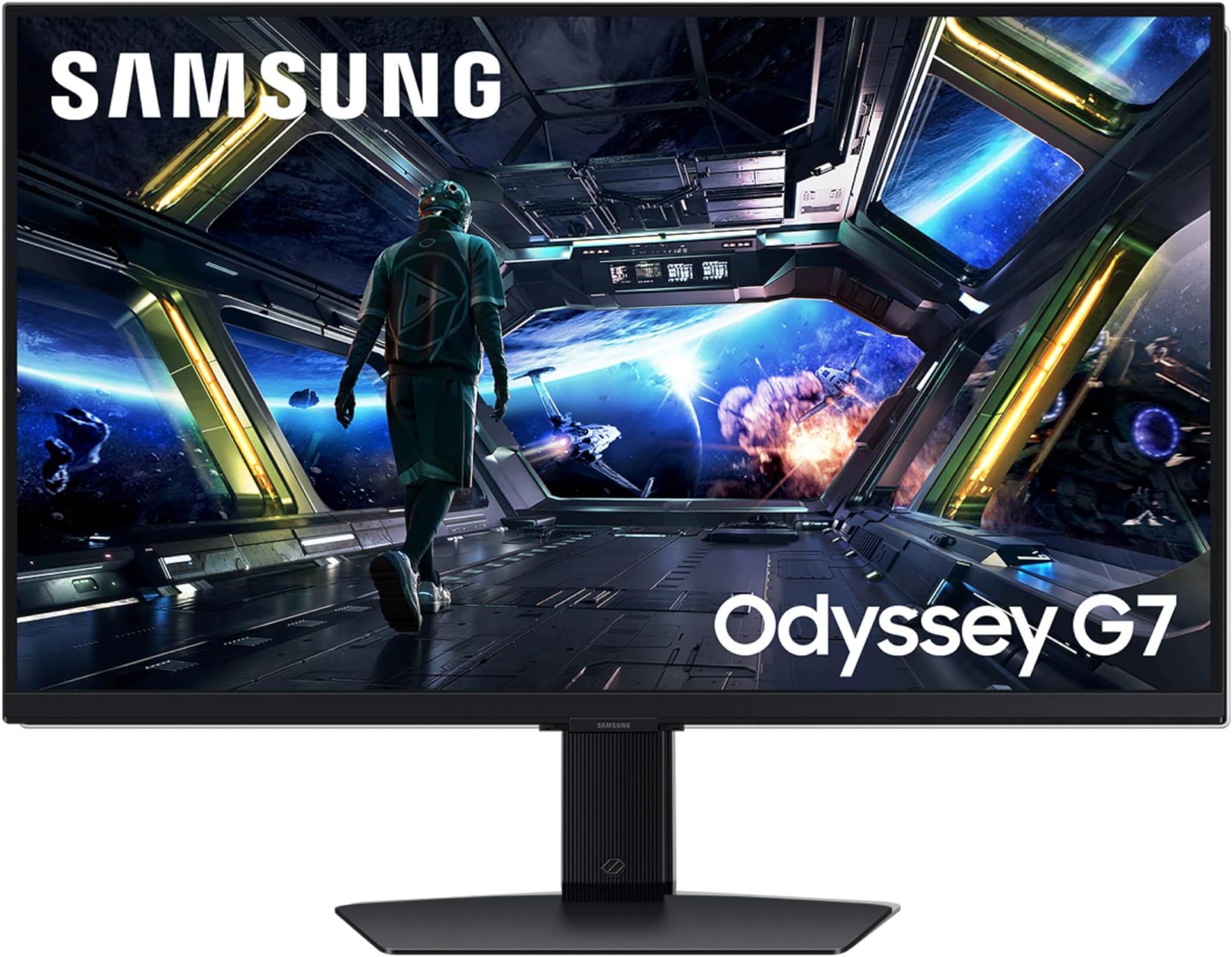
Samsung Odyssey G7
The immersive high-refresh pick — a 27/32-inch 1440p curved VA panel at 240Hz with 1ms response, deep blacks and high contrast, and an aggressive 1000R curve for immersion, with adaptive sync. The choice for immersive, contrasty, fast competitive gaming; VA dark-transition smearing and the divisive curve are the trade-offs, and 240Hz needs a strong GPU.
The Samsung Odyssey G7 is the pick for a fast, immersive, curved high-refresh experience with punchy contrast. It's a 27/32-inch 1440p curved VA panel at a very high 240Hz with 1ms response, delivering extremely smooth, fluid motion ideal for fast and competitive gaming, while the aggressive 1000R curve wraps the image around your field of view for immersion. The VA panel gives deep blacks and high contrast — better than IPS for dark scenes and a punchy look — with adaptive sync. It's the choice for curve immersion, VA contrast, and a 240Hz refresh for fast games. VA's slightly slower dark-transition response (potential smearing), the divisive curve (great for gaming, less so for productivity), and 240Hz needing a powerful GPU are the trade-offs, but for immersive, contrasty, high-refresh gaming, it's the standout.
Pros
- ✓Very high 240Hz refresh, 1ms response — ultra-smooth
- ✓Deep blacks and high VA contrast
- ✓Immersive 1000R curve
- ✓Adaptive sync
Cons
- ✗VA dark-transition smearing; curve divisive for productivity
- ✗240Hz needs a powerful GPU to fully use

Asus Tuf Vg27aq
The value IPS sweet spot — a 27-inch 1440p IPS at 165Hz with fast response, adaptive sync, and ASUS gaming features (ELMB), hitting the same ideal 1440p high-refresh balance as the LG for typically less. Slightly less feature-rich/color-tuned than the top LG, but excellent core gaming and strong value.
The ASUS TUF VG27AQ delivers high-refresh 1440p IPS gaming at a more accessible price, from ASUS's reliable gaming line. It's a 27-inch 1440p IPS panel at 165Hz with fast response, adaptive sync, and ASUS's well-regarded gaming features including ELMB motion-blur reduction, hitting the same ideal 27-inch/1440p/high-refresh sweet spot as the LG but typically for less. It offers excellent IPS colour and smooth fast motion, with the ASUS TUF line's solid build and value. It's the choice for the 1440p high-refresh IPS experience for less than the premium LG. It's a touch less feature-rich or colour-tuned than the top LG in some respects, but the core gaming experience is excellent and the value is strong, making it a savvy alternative for the same sweet spot at a lower price.
Pros
- ✓Same ideal 1440p 165Hz IPS sweet spot for less
- ✓Excellent IPS colour, fast smooth motion
- ✓Adaptive sync and ELMB motion-blur reduction
- ✓Solid ASUS TUF build and value
Cons
- ✗Slightly less feature-rich/colour-tuned than the top LG
- ✗Needs a capable GPU like any 1440p high-refresh monitor

Alienware Aw2724dm
The premium pick — excellent panel, very high refresh, fast response, premium Alienware build and design, strong image quality, and Dell's solid warranty/support. The flagship-feeling, best-built, best-supported choice for enthusiasts; premium-priced for the build and brand since the core specs are matched by cheaper monitors.
The Alienware AW2724DM is the premium pick for top-tier performance, build quality, and Dell/Alienware's design and support. Alienware monitors are renowned for excellent panels, very high refresh rates, fast response, premium build with the distinctive Alienware design, strong colour and image quality, and Dell's solid warranty and support. The AW2724DM offers high-refresh fast gaming with premium polish, suited to someone who wants a flagship-feeling monitor and values build, design, and support, at a premium price. It's the choice for an enthusiast who wants the best-built, best-supported high-performance gaming monitor and will pay for it. The higher price for the premium build and brand is the trade-off — since the core specs are matched by cheaper monitors like the LG and ASUS — but for premium quality, design, and support, it's the standout.
Pros
- ✓Excellent panel with high refresh and fast response
- ✓Premium build, distinctive Alienware design
- ✓Strong colour and image quality
- ✓Dell's solid warranty and support
Cons
- ✗Premium price for build and brand
- ✗Core specs matched by cheaper monitors

Gigabyte M27q
The feature-value pick — a 27-inch 1440p at 170Hz with fast response and adaptive sync, plus standout extras like a built-in KVM switch (control two PCs with one setup) and USB-C on some models, at a notably low price for the specs. Value-tier panel tuning and less brand polish, but unbeatable specs-and-features-per-dollar.
The Gigabyte M27Q crams impressive specs and extras into an affordable 1440p high-refresh monitor. It's a 27-inch 1440p panel at 170Hz with fast response and adaptive sync, but its standout is the value-added features: a built-in KVM switch (control two computers with one keyboard, mouse, and monitor — genuinely useful for a gaming PC plus a work laptop), USB-C connectivity on some models, and strong image quality, all at a notably low price for the specs. Gigabyte packs a lot of monitor for the money, making it the pick for high-refresh 1440p gaming plus useful productivity features on a budget. It's less of a premium-brand showpiece than the Alienware and its panel tuning is value-tier, but the specs-and-features-per-dollar are excellent, making it the value-with-extras standout — especially if the KVM and USB-C suit a dual gaming/work setup.
Pros
- ✓1440p 170Hz with fast response at a low price
- ✓Built-in KVM switch (control two PCs) and USB-C on some models
- ✓Strong image quality and value
- ✓Great for a dual gaming/work setup
Cons
- ✗Value-tier panel tuning, less brand polish
- ✗Needs a capable GPU like any 1440p high-refresh monitor
Which one is right for you?
For the best all-round gaming balance
Lg Ultragear 27gp850
A 27-inch 1440p 165Hz IPS with fast 1ms response, excellent colour, and adaptive sync nails the high-refresh sweet spot of speed, sharpness, and quality at a sensible price.
For immersive, contrasty competitive gaming
Samsung Odyssey G7
A curved 240Hz VA panel with deep blacks and a wrapping 1000R curve delivers ultra-smooth, immersive, high-contrast gaming for fast and atmospheric games.
For the 1440p high-refresh sweet spot for less
Asus Tuf Vg27aq
The same ideal 1440p 165Hz IPS experience with great colour, fast motion, and ASUS gaming features at a more accessible price — the value pick.
For premium build and support
Alienware Aw2724dm
Excellent high-refresh performance with premium Alienware build, design, and Dell's warranty and support for enthusiasts who want a flagship-feeling monitor.
For features and value in a dual work/gaming setup
Gigabyte M27q
1440p high-refresh gaming plus a built-in KVM and USB-C at a notably low price make it the feature-rich value pick for combining a gaming PC and a work laptop.
Top pick: LG UltraGear 27GP850
The LG UltraGear 27GP850 (and its close siblings) is the best gaming monitor for most people because it balances the things that matter — a fast refresh rate, sharp resolution, excellent response time, and great image quality — at a sensible price. It's a 27-inch 1440p (QHD) IPS panel running at a high refresh rate (165Hz, overclockable higher) with a genuinely fast 1ms response time for an IPS, which means motion is smooth and crisp with minimal blur or ghosting. The IPS panel delivers excellent colour accuracy and wide viewing angles (better colours than typical VA gaming panels), and it supports adaptive sync (G-Sync compatible and FreeSync) to eliminate screen tearing.
Its appeal is being the well-rounded sweet spot: 27-inch 1440p at high refresh is widely considered the ideal balance for gaming — sharper than 1080p but far easier to drive than 4K (so a mid-to-high-end GPU can actually hit high frame rates at this resolution), and 27 inches is the ideal size for that resolution. The fast IPS panel gives you both competitive-grade speed and the beautiful colours that VA and TN gaming panels often sacrifice. For someone building or upgrading a gaming setup who wants the best all-round balance of speed, sharpness, image quality, and value, it's the benchmark.
The honest caveats: 1440p at high refresh needs a reasonably capable GPU to fully exploit (though it scales down gracefully), it's not a 4K monitor (those wanting maximum resolution for single-player visual showcases on a top-end GPU should look at 4K options), and IPS has slightly less deep blacks than VA. But for the best combination of refresh rate, resolution, response time, and colour quality at a sensible price — the 1440p high-refresh sweet spot — the LG UltraGear is the one most people should buy.
Best curved/immersive and the esports-value pick: Samsung Odyssey G7 and ASUS TUF VG27AQ
The Samsung Odyssey G7 is the pick for someone who wants a fast, immersive, curved high-refresh experience with punchy contrast. It's a 27 or 32-inch 1440p curved VA panel with a very high refresh rate (240Hz) and a fast 1ms response, delivering extremely smooth, fluid motion ideal for fast-paced and competitive gaming, while the aggressive 1000R curve wraps the image around your field of view for an immersive feel. The VA panel gives deep blacks and high contrast (better than IPS for dark scenes and that punchy, contrasty look), and it supports adaptive sync. It's the choice for someone who wants the immersion of a curve, the contrast of VA, and a very high 240Hz refresh for fast games. The trade-offs: VA panels have slightly slower pixel response in dark transitions than the best IPS (potential for some smearing), the curve is a personal preference (great for gaming immersion, divisive for general/productivity use), and 240Hz needs a powerful GPU to fully use — but for immersive, contrasty, high-refresh gaming, it's the standout.
The ASUS TUF VG27AQ is the value sweet-spot pick that delivers high-refresh 1440p IPS gaming at a more accessible price, from ASUS's reliable gaming line. It's a 27-inch 1440p IPS panel at 165Hz with fast response, adaptive sync, and ASUS's well-regarded gaming features (including ELMB motion-blur reduction), hitting the same ideal 27-inch/1440p/high-refresh sweet spot as the LG but typically at a lower price. It offers excellent IPS colour and smooth fast motion, and the ASUS TUF line is known for solid build and value. It's the choice for someone who wants the 1440p high-refresh IPS experience for less than the premium LG. It's a touch less feature-rich or color-tuned than the top LG in some respects, but the core gaming experience is excellent and the value is strong, making it a savvy alternative.
Choose between them by preference. The Samsung Odyssey G7 wins for immersive curve, VA contrast/deep blacks, and a very high 240Hz refresh for competitive play. The ASUS TUF VG27AQ wins as the value 1440p high-refresh IPS pick. The Samsung is the immersive high-refresh VA pick; the ASUS the value IPS sweet-spot pick.
The premium all-rounder and the feature-value pick: Alienware AW2724DM and Gigabyte M27Q
The Alienware AW2724DM (and Alienware's gaming monitors generally) is the premium pick for someone who wants top-tier performance, build quality, and Dell/Alienware's design and support. Alienware monitors are renowned for excellent panels, very high refresh rates, fast response, premium build with the distinctive Alienware design, strong colour and image quality, and Dell's solid warranty and support (often including a good dead-pixel/burn-in policy). A monitor like the AW2724DM offers high-refresh fast gaming with premium polish, suited to someone who wants a flagship-feeling monitor and values build, design, and support, at a premium price. It's the choice for an enthusiast who wants the best-built, best-supported high-performance gaming monitor and will pay for it. The trade-off is mainly the higher price for the premium build and brand, since the core specs are matched by cheaper monitors — but for premium quality and support, it's the standout.
The Gigabyte M27Q is the feature-packed value pick that crams impressive specs and extras into an affordable 1440p high-refresh monitor. It's a 27-inch 1440p panel at a high refresh (170Hz) with fast response and adaptive sync, but its standout is the value-added features: a built-in KVM switch (letting you control two computers with one keyboard, mouse, and monitor — genuinely useful for a gaming PC plus a work laptop), USB-C connectivity on some models, and strong image quality, all at a notably low price for the specs. Gigabyte packs a lot of monitor for the money, making it the pick for someone who wants high-refresh 1440p gaming plus useful productivity features (KVM, USB-C) on a budget. It's less of a premium-brand showpiece than the Alienware and its panel tuning is value-tier, but the specs-and-features-per-dollar are excellent, making it the value-with-extras standout.
Choose between them by priority. The Alienware wins on premium build, design, and support for an enthusiast flagship feel. The Gigabyte M27Q wins on packing high-refresh 1440p plus useful extras (KVM, USB-C) into the best value. The Alienware is the premium pick; the Gigabyte the feature-rich value pick.
How to choose: refresh rate, resolution, GPU match, panel type, and response
Balance refresh rate and resolution against your GPU, because a mismatch wastes money. Higher refresh rate (Hz) means smoother motion — 144-165Hz is the high-refresh sweet spot most gamers notice and benefit from, 240Hz+ matters mainly for competitive fast-paced esports players who'll perceive and use it, and 60Hz is the old baseline. Higher resolution means sharper image — 1440p (QHD) is the current sweet spot (sharper than 1080p, far easier to drive than 4K), while 4K looks stunning but demands a powerful GPU. Crucially, your graphics card must be able to push the frame rates the monitor's refresh and resolution call for: a high-refresh 1440p monitor needs a capable GPU to hit those frame rates, and pairing a 4K 240Hz monitor with a weak GPU is pointless. Match the monitor to your GPU's capability — 1440p high-refresh (the LG/ASUS sweet spot) suits most mid-to-high-end gaming PCs; only go 4K or 240Hz+ if your GPU can drive it.
Choose the panel type for your priorities, because IPS and VA trade off differently. IPS panels (LG UltraGear, ASUS TUF) offer the best colour accuracy, wide viewing angles, and now fast response times — the best all-round choice for vibrant visuals plus gaming speed, and great if you also do creative work. VA panels (Samsung Odyssey G7) offer deeper blacks and higher contrast (better for dark, atmospheric games and a punchy contrasty look) and often come curved, but can have slightly slower dark-transition response (potential smearing) and narrower viewing angles. TN panels (older, less common now) are cheapest and fastest but have poor colour and angles. For most people, a fast IPS is the best balance of speed and image quality; choose VA if you prioritise contrast, deep blacks, and a curved immersive experience for atmospheric or single-player games.
Weigh response time, adaptive sync, size, and features. Response time (how fast pixels change, measured in ms) affects motion clarity — lower is better, and 1ms is excellent (IPS panels reaching 1ms, like the LG and ASUS, give both speed and colour); high response causes ghosting/smearing in fast motion. Adaptive sync (G-Sync compatible / FreeSync) is essential — it syncs the monitor's refresh to your GPU's frame rate to eliminate screen tearing, and you want a monitor that supports the standard matching your GPU (FreeSync for AMD, G-Sync compatible for Nvidia, though most modern monitors support both). Size should match resolution and viewing distance — 27 inches is ideal for 1440p, while 32-inch suits 4K or immersive curves. Useful extras include a KVM switch (Gigabyte — control two PCs with one setup), USB-C (single-cable laptop connection), and good stand adjustability. Buy a monitor whose refresh and resolution match your GPU (1440p high-refresh for most), with a fast IPS panel for balanced quality or VA for contrast/curve, adaptive sync for your GPU brand, and any productivity extras you'll use.
