Best Mesh Wi-Fi Systems 2026: eero vs TP-Link Deco vs Orbi
A single router can't cover a three-storey house or a home with thick walls no matter how many antennas it has — that's a job for mesh, where several units hand your devices off as you move. The trap is buying a three-pack when you needed two nodes, or one whose best features hide behind a monthly fee.
We compared each mesh system on whole-home coverage and node range, backhaul options (wired and dedicated wireless band), band configuration (Wi-Fi 6 vs 6E), setup and app experience, included versus subscription-gated security and parental controls, smart-home integration, and price. Specifications were checked against independent coverage testing and long-term owner reports.
Eero Pro 6e
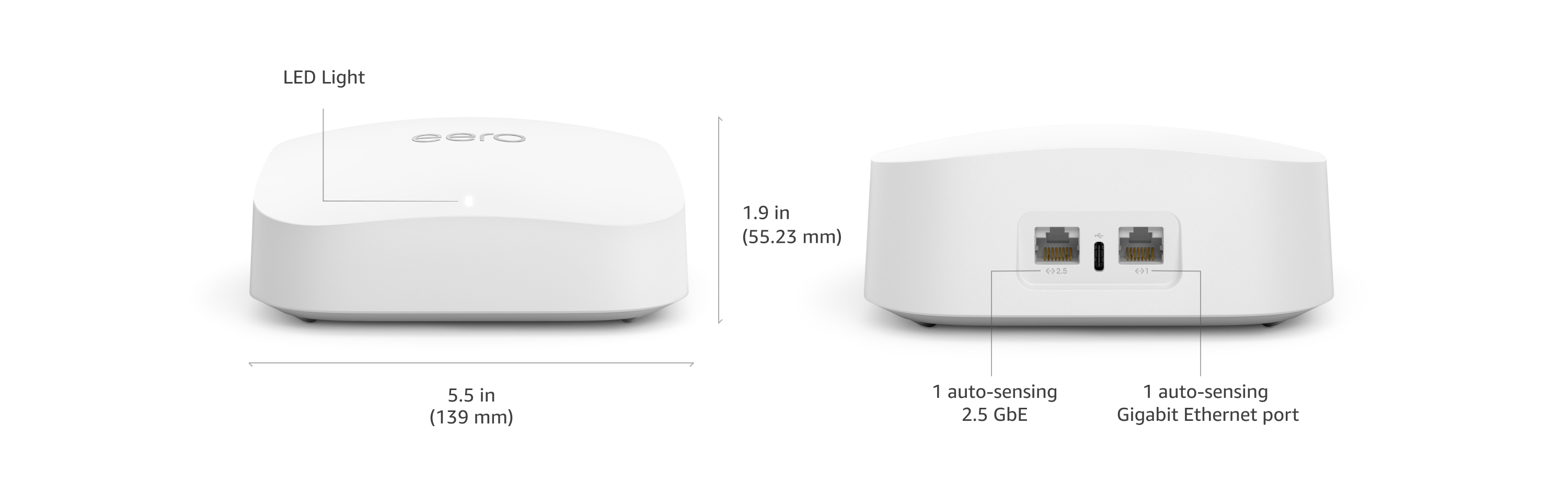
Best Overall: The eero Pro 6E is the best mesh system for most homes, combining the easiest setup in the category with tri-band Wi-Fi 6E performance and a clutter-free design. You scan a code in the app and it self-optimises — no web interface, no channel-picking.
Top picks ↓Related articles


Eero Pro 6e
The best mesh for most homes — effortless app setup, seamless tri-band Wi-Fi 6E coverage, a tidy design, and Alexa/Thread smart-home hub abilities. Advanced security (eero Plus) is a paid add-on, but the core experience is the smoothest here.
The eero Pro 6E is the best mesh system for most homes, combining the easiest setup in the category with tri-band Wi-Fi 6E performance and a clutter-free design. You scan a code in the app and it self-optimises — no web interface, no channel-picking. The tri-band hardware (including the 6 GHz band) delivers fast, reliable coverage across a multi-room home, the node handoff is seamless as you move around, and as an Amazon product it doubles as an Alexa and Zigbee/Thread smart-home hub. You can start with one unit and add nodes later. The caveats: eero Plus security is a paid subscription, and wired backhaul needs you to supply the cabling. For effortless whole-home Wi-Fi with a smart-home bonus, it's the default pick.
Pros
- ✓Easiest setup and self-optimisation in the category
- ✓Tri-band Wi-Fi 6E with seamless node handoff
- ✓Doubles as an Alexa/Thread smart-home hub
- ✓Expandable one node at a time
Cons
- ✗Advanced security (eero Plus) is a paid subscription
- ✗Wired backhaul requires your own cabling

Tp Link Deco Xe75
The value leader — tri-band Wi-Fi 6E covering a large home for less than eero or Orbi, with easy setup, Ethernet ports for wired backhaul, and HomeShield basics included. The best coverage-per-dollar for budget-minded large homes.
The TP-Link Deco XE75 is the value leader — a tri-band Wi-Fi 6E mesh that covers a large home for noticeably less than eero or Orbi, with a friendly app, easy setup, and multiple Ethernet ports on each node for wired backhaul. It includes HomeShield security basics without an immediate subscription, and its coverage-per-dollar is the best here. You give up some of the polish and dedicated-backhaul performance of pricier systems, but for a large home on a budget that still wants 6E and the option to wire nodes together, the Deco XE75 delivers the most whole-home Wi-Fi for the money.
Pros
- ✓Tri-band Wi-Fi 6E at a lower price
- ✓Best coverage-per-dollar for large homes
- ✓Ethernet ports on each node for wired backhaul
- ✓Easy app setup, HomeShield basics included
Cons
- ✗Less dedicated-backhaul performance than Orbi
- ✗Some advanced features are subscription-gated

Netgear Orbi Rbk763s
The performance and coverage champion — a dedicated backhaul band keeps speeds high across big, multi-storey homes, with powerful hardware and strong multi-gig ports. The priciest here, and best security and parental controls need a subscription.
The Netgear Orbi RBK763S is the performance and coverage champion for big houses. Its dedicated backhaul band reserves a whole radio for node-to-node traffic, so the bandwidth your devices use isn't shared with inter-node communication — which keeps speeds high across large and multi-storey homes better than most rivals. The hardware is powerful, range per node is excellent, and it has strong multi-gig wired ports. It's the priciest system here and gates Netgear Armor security and parental controls behind subscriptions, but when raw whole-home performance and coverage matter most, the Orbi is the one to buy.
Pros
- ✓Dedicated backhaul band keeps speeds high
- ✓Excellent range per node for big homes
- ✓Powerful hardware and multi-gig ports
- ✓Top whole-home performance
Cons
- ✗Most expensive system here
- ✗Security and parental controls need subscriptions

Asus Zenwifi Xt9
The enthusiast's mesh — AiMesh firmware with deep QoS, VPN, and device controls, plus AiProtection security and parental controls free for life. Tri-band Wi-Fi 6 with wired backhaul support; mesh simplicity with a router power user's depth and no fees.
The ASUS ZenWiFi XT9 is the enthusiast's mesh, running AiMesh firmware that exposes the deep controls the consumer-friendly systems hide — granular QoS, VPN server and client, detailed device management, custom DNS. Crucially, it includes AiProtection security and parental controls free for the life of the system, which over several years can save more than the price difference versus subscription-based rivals. It supports wired backhaul and strong tri-band Wi-Fi 6. If you want mesh simplicity when you want it but a router power user's control when you need it, with no recurring fees, the XT9 is the pick.
Pros
- ✓Deep AiMesh controls (QoS, VPN, DNS)
- ✓Security and parental controls free for life
- ✓Tri-band Wi-Fi 6 with wired backhaul support
- ✓No subscription, ever
Cons
- ✗App is less beginner-friendly than eero
- ✗Wi-Fi 6 rather than 6E

Amazon Eero 6 Plus
The budget eero — dual-band Wi-Fi 6 with the same effortless setup, seamless handoff, and smart-home hub features for small-to-medium homes at a much lower price. No 6 GHz band, but reliable, simple mesh for a normal home and plan.
The eero 6+ is the budget entry into the eero ecosystem — a dual-band Wi-Fi 6 system that brings the same effortless setup and seamless handoff to smaller homes and apartments for much less than the Pro 6E. It covers a typical home well, doubles as a smart-home hub, and expands with more nodes later. You give up the 6 GHz band and some top-end speed, but for a normal-sized home on a normal internet plan that just wants reliable, simple mesh Wi-Fi without fuss or a big outlay, the eero 6+ delivers the eero experience at the lowest sensible price.
Pros
- ✓Effortless eero setup at a budget price
- ✓Seamless handoff and smart-home hub features
- ✓Covers small-to-medium homes well
- ✓Expandable later
Cons
- ✗Dual-band Wi-Fi 6 — no 6 GHz band
- ✗Lower top-end speed than tri-band systems
Which one is right for you?
For effortless whole-home Wi-Fi
Eero Pro 6e
The easiest setup, seamless tri-band 6E coverage, and smart-home hub abilities make it the smoothest mesh for most multi-room homes.
For a large home on a budget
Tp Link Deco Xe75
Tri-band Wi-Fi 6E and wired-backhaul ports cover a big home for noticeably less, with the best coverage-per-dollar here.
For maximum coverage in a big house
Netgear Orbi Rbk763s
A dedicated backhaul band and powerful hardware keep speeds high across large, multi-storey homes better than most rivals.
For tinkerers who hate subscriptions
Asus Zenwifi Xt9
Deep AiMesh controls plus security and parental controls free for life give power users depth without recurring fees.
For a small home or apartment
Amazon Eero 6 Plus
The same effortless eero experience in dual-band Wi-Fi 6 covers a normal home reliably at the lowest sensible price.
Top pick: eero Pro 6E
The eero Pro 6E is the mesh system to buy for most homes because it combines genuinely effortless setup with tri-band Wi-Fi 6E performance and a clean, no-clutter design. Setup is the best in the category: you scan a code in the eero app, it walks you through placement, and the system self-optimises — no web interface, no manual channel-picking, no jargon. Each compact node disappears on a shelf, and the tri-band hardware (including the 6 GHz band for 6E devices) delivers fast, reliable coverage across a typical multi-room home.
Being an Amazon product, it integrates tightly with Alexa and can act as a Zigbee/Thread smart-home hub, which is a real bonus if your home is full of smart devices. The mesh handoff between nodes is seamless — you stay connected as you walk from the office to the garden — and you can buy single units or multi-packs and add nodes later to extend coverage exactly as far as you need.
Two honest caveats. The basic networking is free, but eero Plus (advanced security, ad blocking, content filtering) is a paid subscription, so factor that in if you want those features. And while the Pro 6E has multi-gig ports on the main unit, wired backhaul (running Ethernet between nodes) requires you to have or run cabling — without it, the wireless backhaul, though tri-band and good, is always slower than a wired link. For effortless whole-home Wi-Fi with a smart-home bonus, the Pro 6E is the default pick.
Best value and the wired-backhaul champion: TP-Link Deco XE75 and Netgear Orbi RBK763S
The TP-Link Deco XE75 is the value leader — a tri-band Wi-Fi 6E mesh that covers a large home for noticeably less than eero or Orbi, with a friendly app, easy setup, and multiple Ethernet ports on each node so you can use wired backhaul where you have cabling. It includes a good amount of security (HomeShield basics) without an immediate subscription, and its coverage-per-dollar is the best here. For a large home on a budget that still wants 6E and the option of wired backhaul, the Deco XE75 is the smart choice.
The Netgear Orbi RBK763S is the performance and coverage champion for big houses. Orbi systems use a dedicated backhaul band — a third radio reserved purely for node-to-node traffic — so the bandwidth your devices use isn't shared with the traffic between units, which keeps speeds high across a large or multi-storey home better than most rivals. The hardware is powerful, the range per node is excellent, and it has strong multi-gig wired ports. It is the system to buy when raw whole-home performance matters most.
The trade-offs split cleanly. The Deco wins on price and value while still offering 6E and wired backhaul. The Orbi wins on outright performance and coverage but costs the most here and gates its best security (Netgear Armor) and parental controls behind subscriptions. Both are excellent; choose the Deco to save money and the Orbi to maximise coverage in a demanding large home.
For tinkerers and the budget pick: ASUS ZenWiFi XT9 and eero 6+
The ASUS ZenWiFi XT9 is the enthusiast's mesh. It runs ASUS's AiMesh firmware, which exposes the deep controls power users want — granular QoS, VPN server and client, detailed device management, custom DNS — that the consumer-friendly eero and Deco apps deliberately hide. Crucially, ASUS includes AiProtection network security and parental controls free for the life of the system, with no subscription, which over several years can save more than the price difference versus subscription-based rivals. It supports wired backhaul and strong tri-band Wi-Fi 6. If you want mesh simplicity with a router enthusiast's control and no recurring fees, the XT9 is the pick.
The eero 6+ is the budget entry into the eero ecosystem. It's a dual-band Wi-Fi 6 (not 6E) system that brings the same effortless eero setup and seamless handoff to smaller homes and apartments at a much lower price. It covers a typical home well, works as a smart-home hub, and can be expanded with more nodes later. You give up the 6 GHz band and some top-end speed versus the Pro 6E, but for a normal-sized home on a normal internet plan that just wants reliable, simple mesh Wi-Fi, the eero 6+ delivers the experience for far less.
Pick between them by temperament and home size. The ZenWiFi XT9 is for the person who wants to tweak settings and avoid subscriptions across a larger home. The eero 6+ is for the person who wants to plug it in, never think about it, and cover a small-to-medium home cheaply. Both are well within reach price-wise; the XT9 offers depth, the eero 6+ offers simplicity and value.
How to choose: node count, backhaul, bands, and subscriptions
Buy the right number of nodes — usually fewer than you think. A two-pack covers most homes up to roughly 3,000–4,000 sq ft or two storeys; a three-pack is for genuinely large or oddly-shaped homes with thick walls. Over-buying nodes that sit too close together doesn't help and can even cause them to interfere. Start with the smaller pack, find any dead zone, and add a single node only if you need it — every system here lets you expand later, so there's no penalty for starting modest.
Understand backhaul, because it's the single biggest factor in mesh speed. Backhaul is how nodes talk to each other. Wired backhaul (running Ethernet between units) is always fastest and most stable — if your home has Ethernet in the walls, use it and any of these systems will fly. Without cabling, the system uses wireless backhaul, where a dedicated band (Orbi's reserved third radio, or a tri-band system's spare band) matters a lot: it keeps node-to-node traffic from stealing the bandwidth your devices need. Prioritise a tri-band system (all but the eero 6+ here) if you can't run wires.
Match bands to your devices and weigh subscriptions. Wi-Fi 6E (eero Pro 6E, Deco XE75, Orbi RBK763S) adds the 6 GHz band, useful as fast wireless backhaul and for 6E client devices, but if nothing you own is 6E and you'll use wired backhaul, dual-band Wi-Fi 6 (eero 6+) is plenty. Finally, read the fee structure: eero (eero Plus) and Netgear (Armor) charge for advanced security and parental controls, while ASUS includes them free for life — across the years you'll own a mesh, that recurring cost is real and worth factoring into the total price.
