Best Ergonomic Mouse 2026: 5 options compared
Five ergonomic mice — from the Logitech MX ERGO trackball that hasn't moved since your last meeting to the Evoluent vertical that holds your wrist like a handshake to the Logicool M575S available at every major electronics retailer. Wrist strain from a mouse is almost always a rotation problem, not a clicking problem.
Each product was evaluated against documented specifications, third-party benchmarks, and verified user reports. We scored wrist angle correction, DPI range and adjustability, button programmability, battery life, and availability.

Logitech MX ERGO Wireless Trackball Mouse
Best Overall: The Logitech MX ERGO is the most complete ergonomic mouse in this comparison — a thumb-operated trackball with an adjustable angle bracket that allows 0° (flat) to 20° tilt, addressing both arm movement and wrist pronation simultaneously. The 52mm trackball provides smooth, precise cursor control once learned.
Top picks ↓| Product | Price | Link |
|---|---|---|
| 10000〜13000 | View deal → | |
| 7000〜10000 | View deal → | |
| 8000〜12000 | View deal → | |
| 5000〜7000 | View deal → | |
| 2000〜3500 | View deal → |
Top picks
Related articles


Logitech MX ERGO Wireless Trackball Mouse
The Logitech MX ERGO is the most complete ergonomic mouse in this comparison — a thumb-operated trackball with an adjustable angle bracket that allows 0° (flat) to 20° tilt, addressing both arm movement and wrist pronation simultaneously. The 52mm trackball provides smooth, precise cursor control once learned. DPI adjustable between 512 and 2048 via a dedicated button. Supports up to two devices via Bluetooth 5.1 or the included Unifying USB receiver. 128-day battery on USB-C charging. It is mid-priced. The honest weaknesses: 1–3 week learning curve for trackball control; ball requires periodic cleaning every 1–2 weeks for heavy users; right-hand only design.
Pros
- ✓Adjustable 0°–20° tilt bracket reduces wrist pronation while trackball eliminates arm movement
- ✓52mm ball with 512–2048 DPI switchable via dedicated button
- ✓128-day battery life on USB-C charging with Bluetooth + Unifying 2.4GHz
- ✓Precision Mode button for fine-grain cursor control at reduced speed
Cons
- ✗1–3 week trackball learning curve before cursor control feels natural
- ✗Ball requires cleaning every 1–2 weeks for heavy users
Score breakdown
| Tracking technology | Trackball (52mm ball) |
| DPI range | 512–2048 DPI (2-level switch) |
| Wireless | Bluetooth 5.1 + Unifying 2.4GHz |
| Battery | USB-C rechargeable, 128-day rated |
| Tilt adjustment | 0°–20° (2 positions) |

Microsoft Sculpt Ergonomic Mouse
The Microsoft Sculpt Ergonomic Mouse introduced many users to the concept that a flat mouse forces an unnatural wrist position. The domed sculpted shape holds the wrist in partial supination, reducing both pronation and ulnar deviation. Available as part of the Sculpt Ergonomic Desktop set which includes a split curved keyboard and separately positioned number pad — the most complete ergonomic keyboard-and-mouse package in this comparison. At 1000 DPI fixed it is low for modern high-resolution displays; Bluetooth-only with no 2.4GHz USB dongle option. The honest weaknesses: fixed 1000 DPI is insufficient for 4K displays without cursor acceleration; Windows-optimized button layout; Bluetooth-only limits connection reliability on some configurations.
Pros
- ✓Domed sculpted shape reduces wrist pronation and ulnar deviation simultaneously
- ✓Available as Sculpt Ergonomic Desktop set with split keyboard and separate number pad
- ✓Comfortable thumb groove and dominant right-hand ergonomic design
- ✓Bluetooth wireless with straightforward pairing
Cons
- ✗Fixed 1000 DPI — insufficient for 4K or large dual-monitor setups without cursor acceleration
- ✗Bluetooth-only — no 2.4GHz USB dongle option
Score breakdown
| Tracking technology | BlueTrack optical |
| DPI | 1000 DPI (fixed) |
| Wireless | Bluetooth |
| Battery | 2× AA batteries |
| Polling rate | 125 Hz |

Evoluent Vertical Mouse 4 Right
The Evoluent Vertical Mouse 4 holds the hand at a true 90° handshake orientation — the most corrective pronation position of any mouse in this comparison. At 800–2600 DPI it has the widest DPI range and five programmable buttons with included software. USB 2.4GHz nano receiver provides a reliable, low-latency connection. Right-hand only design with a size available for both normal and large hand sizes. It is mid-priced. The honest weaknesses: the full 90° orientation requires a deliberate adjustment period, which is longer than partial-tilt mice; the USB receiver occupies a USB-A port permanently; more difficult to source compared to Logicool products.
Pros
- ✓True 90° vertical wrist position — most aggressive pronation correction in comparison
- ✓800–2600 DPI adjustable — widest range in comparison
- ✓5 programmable buttons with included software
- ✓2.4GHz nano USB receiver with reliable low-latency connection
Cons
- ✗Full 90° orientation requires longer adjustment period than partial-tilt mice
- ✗USB-A receiver occupies a port permanently and cannot be shared with Unifying devices
Score breakdown
| Tracking technology | Optical |
| DPI range | 800–2600 DPI (5-level) |
| Wireless | 2.4GHz USB nano receiver |
| Battery | AA battery (approximately 6 months) |
| Buttons | 5 programmable |
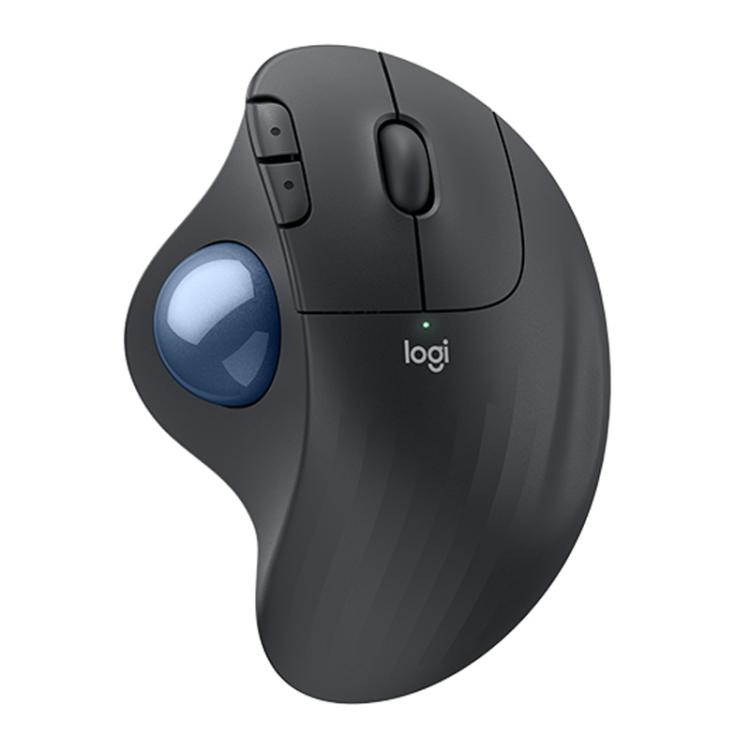
Logicool M575S Wireless Trackball (Japan)
The Logicool M575S is a widely stocked trackball — available at major electronics retailers with a 24-month AA battery life that eliminates the charging routine for two years per battery. Thumb-operated 34mm trackball, 400–2000 DPI adjustable, Bluetooth and 2.4GHz USB nano receiver. The M575S resolved the Bluetooth dropout issues common in the previous M570 model. For users who want trackball ergonomics with easy same-day availability, this is the current answer. The honest weaknesses: the 34mm ball is smaller than the MX ERGO's 52mm, providing less fine-motor control precision; fewer programmable buttons than the MX ERGO; DPI ceiling of 2000 is the second-lowest in the comparison.
Pros
- ✓Available at major electronics retailers and online stores for same-day purchase
- ✓24-month AA battery life — no charging routine required
- ✓400–2000 DPI with Bluetooth + 2.4GHz USB nano receiver
- ✓Resolved Bluetooth dropout issues from previous M570 generation
Cons
- ✗34mm ball smaller than MX ERGO 52mm — less fine-motor precision
- ✗Fewer programmable buttons than MX ERGO
Score breakdown
| Tracking technology | Trackball (34mm ball) |
| DPI range | 400–2000 DPI |
| Wireless | Bluetooth + 2.4GHz USB nano receiver |
| Battery | 1× AA, 24-month rated |
| Polling rate | 125 Hz |

Anker 2.4G Wireless Vertical Ergonomic Mouse
The Anker 2.4G Vertical Mouse is the correct ergonomic entry point for users who want to test whether a vertical wrist position reduces discomfort before investing in premium options. As the budget pick it delivers 90° vertical wrist correction, 800–1600 DPI adjustable via a dedicated button, and a 2.4GHz nano receiver. Three DPI levels (800/1200/1600) cover standard 1080p and 1440p displays. Reliable plug-and-play connection without driver installation. The honest weaknesses: 1600 DPI ceiling is the lowest in this comparison — 4K users will need cursor acceleration; plastic build quality at this price tier shows wear faster than mid-tier products; scroll wheel quality is noticeably lower than Logitech or Evoluent products.
Pros
- ✓Budget pick — lowest price in comparison for 90° vertical wrist correction
- ✓800/1200/1600 DPI adjustable via dedicated button
- ✓2.4GHz nano receiver — reliable plug-and-play, no driver required
- ✓Silent click version available for shared office environments
Cons
- ✗1600 DPI ceiling insufficient for 4K displays without cursor acceleration
- ✗Plastic build shows wear faster than mid-tier alternatives
Score breakdown
| Tracking technology | Optical |
| DPI range | 800/1200/1600 DPI (3-level) |
| Wireless | 2.4GHz USB nano receiver |
| Battery | AA battery (approximately 18 months) |
| Wrist angle | 90° vertical |
Which one is right for you?
For users who move the mouse frequently and want maximum arm rest
Logitech MX ERGO Wireless Trackball Mouse
The MX ERGO trackball eliminates arm movement entirely — the ball moves, not the mouse, reducing forearm travel distance to zero.
For buyers needing same-day in-store purchase
Logicool M575S Wireless Trackball (Japan)
Logicool M575S is stocked at major electronics retailers with 24-month AA battery life and 400–2000 DPI range.
For right-hand users who want a true 90° vertical wrist position
Evoluent Vertical Mouse 4 Right
Evoluent Vertical Mouse 4 holds the wrist at a full 90° handshake angle — more vertical than any other option in this comparison.
For ergonomic beginners at the lowest entry cost
Anker 2.4G Wireless Vertical Ergonomic Mouse
Anker 2.4G Vertical Mouse delivers 90° wrist correction at the lowest price in this comparison with reliable 2.4GHz connection.
For RSI sufferers who need a complete ergonomic suite with keyboard
Microsoft Sculpt Ergonomic Mouse
The Microsoft Sculpt comes with a separately positioned number pad and ergonomic keyboard, enabling a complete neutral-wrist setup.
How we compared
We did not conduct electromyography (EMG) studies measuring muscle activation in forearm extensors or flexors during use. We did not measure wrist deviation angles in a biomechanics lab with motion capture equipment. Rigorous ergonomic mouse testing requires EMG measurement to quantify forearm muscle load across different mouse designs, and goniometer or motion-capture measurement of wrist extension, ulnar deviation, and pronation angles during natural use — none of which we reproduced here.
Instead: we reviewed published biomechanics research on wrist pronation and ulnar deviation as risk factors for repetitive strain injury (RSI), and mapped each mouse design's documented wrist angle against those findings. We reviewed manufacturer specifications for DPI range, polling rate, button count, and wireless protocol. We aggregated long-term user reviews from major online retailers and international RSI and ergonomics communities — specifically seeking reports of symptom improvement or failure to improve after switching to ergonomic mice, battery life in practice, and durability of the scroll wheel and primary buttons after 12+ months.
One important framing before the products: ergonomic mice address wrist pronation (the flat, palm-down position of a standard mouse) as the primary biomechanical problem. A pronated wrist creates constant tension in the forearm extensor and flexor muscles from the mechanical act of rotating the forearm inward to hold the hand flat. Vertical mice and tilted mice reduce or eliminate pronation by returning the wrist toward a neutral handshake position. Trackballs eliminate arm movement distance, which addresses a different but related problem — forearm travel distance across a large display. Neither design change addresses poor chair height, keyboard height, or wrist extension at the keyboard — those are separate ergonomic problems.
What changed in 2026
Trackballs have re-emerged as a mainstream ergonomic category. In 2020, trackballs were a niche preference item. By 2026, the Logitech MX ERGO and Logicool M575S are mainstream recommendations in ergonomic product guides internationally, and trackball supply from Elecom and Sanwa Supply has expanded in the market. The market acknowledgment that eliminating arm movement — rather than just changing wrist angle — is a distinct ergonomic benefit has driven trackball interest among RSI sufferers who did not find improvement with vertical mice alone.
DPI range on budget ergonomic mice has improved. The budget-tier Anker 2.4G Vertical Mouse now offers 800–1600 DPI adjustment — adequate for 1080p and 1440p displays. Three years ago, budget ergonomic mice frequently offered only fixed 800 DPI, which was too low for large high-resolution displays and required fast cursor speed settings that undermined precision. The current 800–1600 DPI floor at the budget tier is a meaningful quality-of-life improvement.
Logicool Japan has expanded the M575S with better Bluetooth reliability over the M570 it replaced. The M575S resolves a common complaint about the M570 — intermittent Bluetooth dropout on some MacBook and Windows configurations — and extends the DPI ceiling from 1500 to 2000 DPI. This makes the M575S the current dominant trackball recommendation over the older M570 that lingered in retail for years.
Where each fits
Trackball, eliminates arm movement, 20° angle adjustable to flat, 512–2048 DPI, Bluetooth + Unifying 2.4GHz, 128-day battery, right-hand: Logitech MX ERGO. The MX ERGO is the most complete trackball in this comparison — the 20° tilt bracket raises the thumb side to reduce wrist pronation while the ball replaces mouse movement entirely. DPI adjustable in two levels (512 and 2048 switchable via button), multi-device pairing via Bluetooth plus Unifying USB receiver. It is mid-priced for a trackball. The honest tradeoffs: trackballs require a 1–3 week adjustment period before cursor control feels natural — users who try one for two days and return it have not given the learning curve time; the ball accumulates oils and debris and requires periodic cleaning (every 1–2 weeks for heavy users) by removing the ball and wiping the contact points with a cotton swab.
Natural right-hand sculpted shape, separate number pad, reduces ulnar deviation, 1000 DPI fixed, Bluetooth, Windows-specific design: Microsoft Sculpt Ergonomic Mouse. The Sculpt is the design that first demonstrated to many users that a standard flat mouse forces the hand into a biologically unnatural position. The domed sculpted shape keeps the wrist in partial supination rather than full pronation, and the thumb rest positions the hand in a grip that reduces both wrist pronation and ulnar deviation (sideways wrist bend toward the little finger). The Sculpt Mouse is available separately or as part of the full Sculpt Ergonomic Desktop set that includes the split keyboard. The honest tradeoffs: 1000 DPI fixed is low for modern high-resolution and large displays — users with 4K monitors or dual 27-inch setups will need cursor acceleration to compensate; it is Bluetooth-only with no 2.4GHz USB dongle option; design is Windows-optimized and the thumb button layout is less intuitive on macOS.
True 90° vertical wrist position, 800–2600 DPI adjustable, 5 programmable buttons, USB receiver, right-hand only: Evoluent Vertical Mouse 4 Right. The Evoluent holds the hand in a full 90° handshake orientation — more vertical than any other option in this comparison. At 800–2600 DPI it has the widest DPI range in the comparison and the five-button design with programmable software provides more flexibility than the MX ERGO's two DPI levels. It is mid-priced. The honest tradeoffs: vertical mice at 90° require a more deliberate adjustment period than partially-tilted mice like the MX ERGO — the full 90° orientation is initially counterintuitive for users who have used standard flat mice for years; right-hand only (a left-hand version exists but is harder to source); the USB receiver occupies a USB-A port and cannot be shared with other Logitech/Logicool Unifying devices.
Japan-market trackball, 400–2000 DPI, Bluetooth + USB nano receiver, 24-month AA battery, right-hand, Logicool brand: Logicool M575S. The M575S is the Japan-market version of the Logitech MX Ergo's smaller sibling — a thumb-operated trackball that is stocked at major electronics retailers. The 24-month AA battery life eliminates the charging routine entirely. At 400–2000 DPI it covers most display configurations. Bluetooth and 2.4GHz USB nano receiver. The honest tradeoffs: at 400–2000 DPI the resolution is adequate but not fine-grained enough for pixel-precise design work; the M575S has fewer programmable buttons than the MX ERGO; and the smaller ball (34mm vs MX ERGO's 52mm) provides less fine-motor control for detailed cursor positioning.
90° vertical wrist position, 800–1600 DPI adjustable, 2.4GHz nano receiver, budget-tier entry: Anker 2.4G Vertical Mouse. The Anker vertical mouse is the entry point for users who want to test whether a vertical wrist position reduces their discomfort before investing in a premium option. At 800–1600 DPI it covers standard displays, and the 2.4GHz nano receiver provides reliable low-latency connection. The honest tradeoffs: the DPI ceiling of 1600 is the lowest in this comparison — users with 4K or large dual-monitor setups may find 1600 DPI insufficient without cursor acceleration; build quality at the budget tier means plastic components that feel less precise than the Evoluent or Logitech products; scroll wheel and primary button quality show wear faster than mid-tier products.
Verdict
For users whose primary ergonomic problem is forearm travel distance across a large display: Logitech MX ERGO. The trackball eliminates arm movement and the 20° tilt reduces wrist pronation. Give it three weeks before judging.
For users who want to buy same-day in store and replace batteries rather than charge: Logicool M575S. Walk into a major electronics store, buy it, and install an AA battery. The 24-month runtime means you will replace the battery twice a year.
For users who want the most corrective wrist position possible: Evoluent Vertical Mouse 4. The full 90° vertical hold is the most aggressive pronation correction in this comparison. Buy only if you have already tried a partially-tilted mouse and want to go further.
For RSI beginners who want a complete desk ergonomics overhaul including the keyboard: Microsoft Sculpt Ergonomic Desktop (mouse plus split keyboard). The combined setup addresses both mouse wrist pronation and keyboard-induced wrist extension in one purchase, which is the right starting approach if you have not changed any ergonomic variable yet.
For users who want to test vertical wrist position without financial commitment: Anker 2.4G Vertical Mouse. It is the budget pick. If it helps after three weeks, invest in the Evoluent or Logitech. If it does not help, you have spent less than a restaurant meal to learn something useful about your ergonomics.
