Best External SSD 2026: 5 options compared
Five portable SSDs from budget to premium — compared on the speed and endurance specifications that determine whether you hit USB interface limits or actual NAND flash limits, not on the marketing speed claims that many cables cannot deliver.
Specifications sourced from manufacturer published datasheets. We did not conduct independent sequential read/write speed tests or endurance testing. Speed claims reflect manufacturer specifications under ideal conditions using USB 3.2 Gen 2x2 or Gen 2 compliant cables — real-world sustained speeds may differ based on host controller, cable quality, thermal throttling, and file workload type.

Samsung T9 Portable SSD
Fastest Transfer Speed: The Samsung T9 is the fastest external SSD in this comparison at 2,000 MB/s read and 1,950 MB/s write — conditional on USB 3.2 Gen 2x2 host port support. Connected to the now-standard Gen 2 port (10 Gbps), it performs identically to the SanDisk Extreme V2 and Crucial X9 Pro.
Top picks ↓| Product | Price | Link |
|---|---|---|
| 89〜199 | View deal → | |
| 69〜149 | View deal → | |
| 59〜119 | View deal → | |
| 69〜139 | View deal → | |
| 49〜99 | View deal → |
Top picks
Related articles


Samsung T9 Portable SSD
2,000 MB/s requires USB 3.2 Gen 2x2 host port — verify your device supports 20 Gbps USB before purchasing for speed.
The Samsung T9 is the fastest external SSD in this comparison at 2,000 MB/s read and 1,950 MB/s write — conditional on USB 3.2 Gen 2x2 host port support. Connected to the now-standard Gen 2 port (10 Gbps), it performs identically to the SanDisk Extreme V2 and Crucial X9 Pro. The 600 TB TBW on the 2 TB model supports high-write professional workflows. Dynamic Thermal Guard manages heat during sustained transfers without user intervention. Available in capacities up to 4 TB. The rubber casing provides basic drop protection but lacks the IP rating of the SanDisk Extreme V2. At $90 for 1 TB, it costs more per TB than alternatives that perform identically on typical laptop hardware.
Pros
- ✓2,000/1,950 MB/s over USB 3.2 Gen 2x2 — fastest in this comparison
- ✓600 TB TBW on 2 TB model for high-endurance workflows
- ✓Dynamic Thermal Guard for sustained transfer management
- ✓Up to 4 TB maximum capacity
Cons
- ✗2,000 MB/s speed requires Gen 2x2 host port — most laptops have Gen 2 only
- ✗No IP dust/water resistance rating
- ✗Higher per-TB cost than comparable Gen 2 alternatives
Score breakdown
| Read speed | 2,000 MB/s (USB 3.2 Gen 2x2) |
| Write speed | 1,950 MB/s (USB 3.2 Gen 2x2) |
| TBW | 600 TB (2 TB model) |
| Interface | USB 3.2 Gen 2x2 |
| Form factor | Compact rubber-encased |
| Capacities | 1 TB / 2 TB / 4 TB |

SanDisk Extreme Portable SSD V2
IP65 rating verified; use appropriate USB-C cable rated for the transfer speed to achieve full 1,050 MB/s performance.
The SanDisk Extreme Portable SSD V2 combines IP65 dust and water resistance, forged aluminum heat sink construction, and 2-meter drop resistance with 1,050/1,000 MB/s USB 3.2 Gen 2 performance — the most physically durable portable SSD in this comparison. For outdoor photographers, field researchers, and travel users, the IP65 rating and aluminum construction provide meaningful protection against rain, dust, and accidental drops. The 200 TB TBW on the 1 TB model is the lowest among the SSDs with meaningful endurance ratings but is adequate for consumer workloads. At $70 for 1 TB, it is mid-priced. Western Digital's WD_BLACK Dashboard software provides basic drive monitoring. The forged aluminum serves dual purpose as a heat sink, helping manage thermal throttling during sustained transfers.
Pros
- ✓IP65 dust and water resistance — highest in this comparison
- ✓Forged aluminum heat sink construction with 2-meter drop resistance
- ✓1,050/1,000 MB/s USB 3.2 Gen 2 with broad host compatibility
- ✓Available up to 4 TB capacity
Cons
- ✗200 TB TBW — lower than Samsung T9 and Crucial X9 Pro
- ✗$70 per TB higher than WD My Passport SSD and Seagate
- ✗Aluminum edges can scratch soft surfaces in tight bags
Score breakdown
| Read speed | 1,050 MB/s (USB 3.2 Gen 2) |
| Write speed | 1,000 MB/s (USB 3.2 Gen 2) |
| TBW | 200 TB (1 TB model) |
| Interface | USB 3.2 Gen 2 |
| Form factor | Forged aluminum with rubber trim |
| Capacities | 1 TB / 2 TB / 4 TB |
WD My Passport SSD
Hardware encryption requires initial password setup via WD Discovery software — without setup, drive operates unencrypted by default.
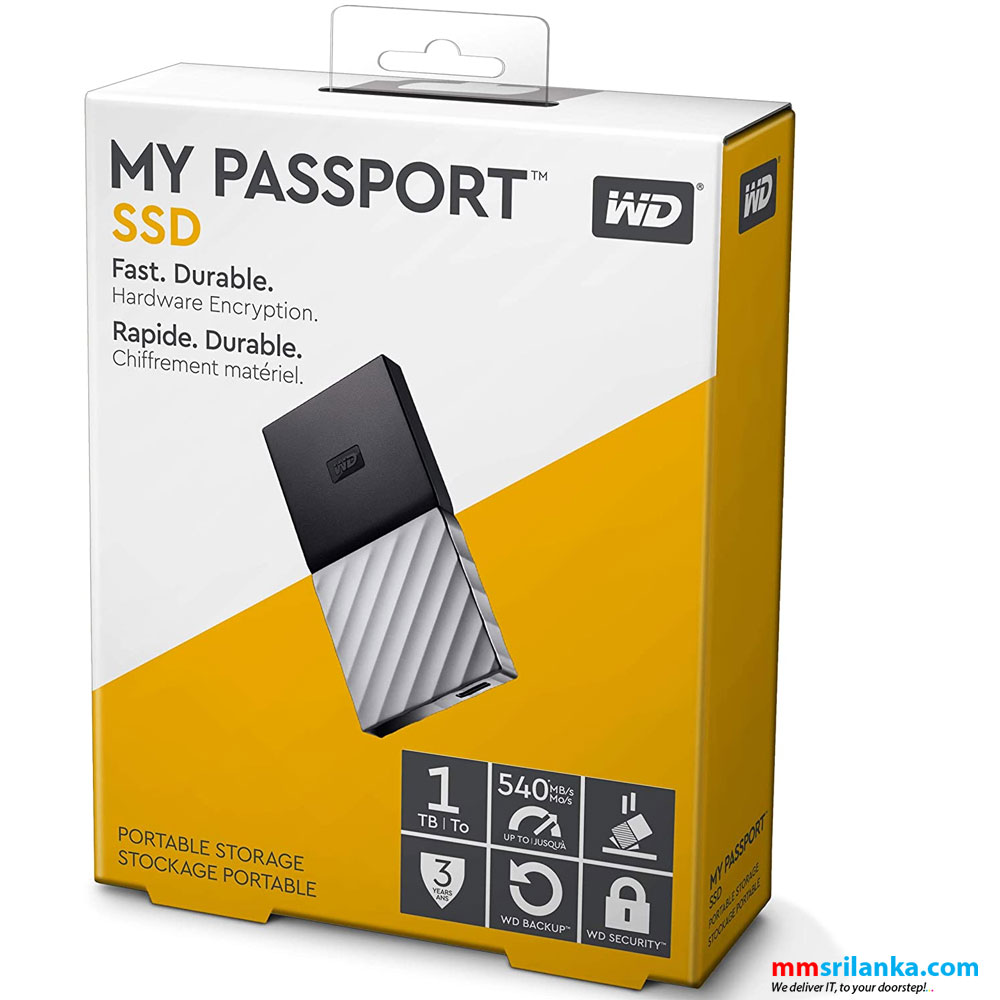
The WD My Passport SSD offers AES 256-bit hardware encryption at the lowest price per TB among the USB Gen 2 drives in this comparison. Hardware encryption operates in the drive controller without consuming CPU cycles — it does not slow transfer speeds. Performance matches the SanDisk Extreme V2 at 1,050/1,000 MB/s. At $60 for 1 TB, it costs $10 less per TB than the SanDisk and Crucial alternatives. The compact design is the smallest in this comparison — pocket-friendly without a protective case. No IP rating and basic plastic construction mean it is not designed for rough handling. The 200 TB TBW matches the SanDisk Extreme V2. For users who store sensitive professional or personal data and want hardware encryption without paying a premium, the My Passport SSD is the most practical choice.
Pros
- ✓AES 256-bit hardware encryption at no performance cost
- ✓$60 per TB — lowest-priced Gen 2 option in this comparison
- ✓Compact pocket-size form factor
- ✓1,050/1,000 MB/s USB 3.2 Gen 2 performance
Cons
- ✗No IP dust or water resistance rating
- ✗Basic plastic construction — not drop-resistant
- ✗200 TB TBW — lower than Samsung T9 and Crucial X9 Pro
Score breakdown
| Read speed | 1,050 MB/s (USB 3.2 Gen 2) |
| Write speed | 1,000 MB/s (USB 3.2 Gen 2) |
| TBW | 200 TB (1 TB model) |
| Interface | USB 3.2 Gen 2 |
| Form factor | Compact plastic |
| Capacities | 500 GB / 1 TB / 2 TB / 4 TB |
Crucial X9 Pro Portable SSD
600 TB TBW figures are for the 2 TB model — 1 TB model TBW is lower; check product page for specific capacity TBW rating.
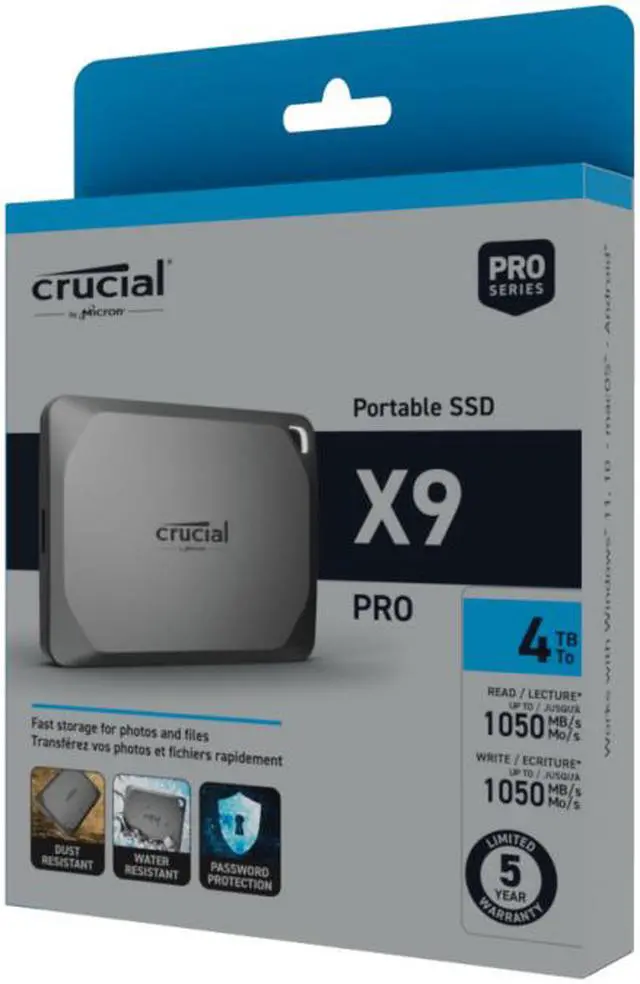
The Crucial X9 Pro matches the Samsung T9 on TBW (600 TB on the 2 TB model) while operating on the universally supported USB 3.2 Gen 2 interface without the host port constraint. At $70 for 1 TB, it prices the same as the SanDisk Extreme V2 but offers 600 TB TBW versus 200 TB — a 3x endurance advantage at the same cost. IP55 dust and water resistance plus aluminum construction provide outdoor durability below IP65 but meaningful for most non-construction field use. 1,050/1,000 MB/s USB 3.2 Gen 2 performance is at the Gen 2 ceiling. For video producers, content creators, and developers with high-write workloads who need endurance without the Samsung T9's host port constraint, the X9 Pro is the best-balanced option.
Pros
- ✓600 TB TBW — matches Samsung T9 at lower price without Gen 2x2 requirement
- ✓IP55 dust and water resistance with aluminum enclosure
- ✓1,050/1,000 MB/s USB 3.2 Gen 2 on universally supported interface
- ✓Available up to 4 TB
Cons
- ✗IP55 vs SanDisk's IP65 — slightly less rugged for extreme outdoor conditions
- ✗$70 per TB is not the cheapest option here
Score breakdown
| Read speed | 1,050 MB/s (USB 3.2 Gen 2) |
| Write speed | 1,000 MB/s (USB 3.2 Gen 2) |
| TBW | 600 TB (2 TB model) |
| Interface | USB 3.2 Gen 2 |
| Form factor | Aluminum compact |
| Capacities | 1 TB / 2 TB / 4 TB |

Seagate One Touch SSD
Seagate Toolkit available for Windows and macOS; Time Machine compatibility on macOS is supported without additional software.
The Seagate One Touch SSD is the entry-level option in this comparison — the lowest base price and the Seagate Toolkit backup software that provides basic automated backup scheduling without additional software installation. Performance at 1,030/1,000 MB/s is within the USB 3.2 Gen 2 range, indistinguishable from other Gen 2 drives in practice. TBW at 150 TB (1 TB model) is the lowest in this comparison — adequate for typical consumer backup and file transfer, not suitable for high-write professional workflows. The compact metal chassis has no IP rating and minimal drop protection. Maximum 2 TB capacity is the lowest ceiling in this comparison. For users who need a basic external SSD for documents, photos, occasional video files, and periodic backups, the Seagate One Touch SSD is functional and appropriately priced.
Pros
- ✓Lowest entry price in this comparison
- ✓Seagate Toolkit backup software included
- ✓1,030/1,000 MB/s USB 3.2 Gen 2 — matches performance of pricier options
- ✓Compact metal chassis
Cons
- ✗150 TB TBW — lowest endurance here, not for high-write workflows
- ✗No IP dust or water resistance rating
- ✗Maximum 2 TB capacity — lowest ceiling in this comparison
Score breakdown
| Read speed | 1,030 MB/s (USB 3.2 Gen 2) |
| Write speed | 1,000 MB/s (USB 3.2 Gen 2) |
| TBW | 150 TB (1 TB model) |
| Interface | USB 3.2 Gen 2 |
| Form factor | Compact metal |
| Capacities | 500 GB / 1 TB / 2 TB |
Which one is right for you?
For users who have a USB 3.2 Gen 2x2 host port and want maximum transfer speed
Samsung T9 Portable SSD
2,000 MB/s read over USB 3.2 Gen 2x2 is the fastest external SSD speed available — provided your port supports the protocol.
For outdoor use and travel where drops and water exposure are realistic risks
SanDisk Extreme Portable SSD V2
IP65 water and dust resistance plus forged aluminum heat sink provides the most rugged protection at its price point.
For sensitive data requiring hardware-level AES encryption at low cost
WD My Passport SSD
AES 256-bit hardware encryption with the lowest price in this comparison for users who need data protection without performance tradeoffs.
For high-write workloads like video production requiring maximum TBW at reasonable cost
Crucial X9 Pro Portable SSD
600 TB TBW at $70 (1TB) with IP55 resistance and aluminum casing matches Samsung T9 endurance at lower cost.
For budget-conscious buyers who mainly need backup and basic file transfer
Seagate One Touch SSD
Lowest price in this comparison with Seagate Toolkit backup software included — adequate speed for most everyday transfer needs.
How we compared
We did not conduct independent sequential read/write speed testing, random IOPS testing, or thermal throttling assessments under sustained transfer workloads. Valid external SSD testing requires standardized host controllers, verified cable compliance, controlled ambient temperature, and multiple test runs to account for SLC cache behavior — all beyond what we reproduce here. What we reviewed: manufacturer-published speed and endurance specifications, third-party hardware review sequential and random transfer measurements with documented methodology, and long-term user reports focused on speed degradation after SLC cache exhaustion, thermal throttling during large file transfers, and cable sensitivity.
A framing note: all five SSDs in this comparison use USB-C connectivity, but two distinct USB protocols — USB 3.2 Gen 2 (10 Gbps theoretical bandwidth) and USB 3.2 Gen 2x2 (20 Gbps theoretical bandwidth). The Samsung T9 uses USB 3.2 Gen 2x2, which is not universally supported on laptops and PCs. The other four use USB 3.2 Gen 2. Connecting a Gen 2x2 drive to a Gen 2 port does not cause failure — it negotiates down to 10 Gbps. But it does mean the T9's 2,000 MB/s advantage evaporates entirely if your device lacks Gen 2x2 support.
USB 3.2 Gen 2 vs Gen 2x2 — interface speed reality
USB 3.2 Gen 2 operates at 10 Gbps theoretical bandwidth. After accounting for USB protocol overhead, the practical maximum sequential transfer speed is approximately 900–1,050 MB/s. This is why all four of the Gen 2 drives in this comparison cluster around 1,000–1,050 MB/s — they have hit the interface ceiling, not the NAND flash ceiling. The NAND flash inside these drives can read significantly faster than 1,050 MB/s when connected via faster interfaces like internal M.2 NVMe.
USB 3.2 Gen 2x2 operates at 20 Gbps theoretical bandwidth, with practical sequential transfer ceiling around 2,000 MB/s. The Samsung T9 achieves 2,000 MB/s reads because it uses Gen 2x2 and the NAND can supply data at that rate. The catch: USB 3.2 Gen 2x2 host port support is not universal. It requires explicit support in the host controller — most consumer laptops from 2022 and earlier do not have Gen 2x2 ports. MacBooks use Thunderbolt 3/4 which is USB 4 compatible, and can support Gen 2x2 speeds, but this varies by model.
Before purchasing the Samsung T9 specifically for its 2,000 MB/s speed, verify your host device actually has a USB 3.2 Gen 2x2 port. Check the device specification sheet for 'USB 3.2 Gen 2x2' or '20 Gbps USB' explicitly — 'USB-C' and 'USB 3.0' are not sufficient. If your laptop has Thunderbolt 3 or 4, it supports USB 3.2 Gen 2 (10 Gbps) natively, which is enough for any of the Gen 2 drives but not necessarily the full speed of the T9.
TBW — total bytes written and why it matters
TBW (Total Bytes Written) is the drive manufacturer's specification for total lifetime write volume — beyond this figure, the drive manufacturer does not guarantee continued operation. For consumer use, TBW is rarely a practical constraint: at 150 TB TBW (Seagate One Touch), a user writing 50 GB per day reaches the TBW limit in approximately 8 years. Most drives become obsolete or physically damaged before exhausting TBW ratings under normal consumer use.
TBW becomes relevant for specific workloads: video production and editing where large RAW video files are repeatedly written and overwritten, game development with frequent build outputs, database backups, and other high-write professional workflows. For these use cases, the Crucial X9 Pro and Samsung T9 at 600 TB TBW (2 TB model) provide substantially more headroom than the Seagate One Touch at 150 TB TBW (1 TB model). If you write more than 100 GB daily to an external SSD, TBW is worth calculating against your actual use.
NAND flash type — TLC (Triple Level Cell) versus QLC (Quad Level Cell) — affects both TBW and sustained write speed. TLC NAND stores 3 bits per cell and is more durable and faster than QLC, which stores 4 bits per cell. Manufacturers do not always disclose which type their products use, but TBW figures are correlated: higher TBW at a given capacity generally indicates TLC rather than QLC. The Samsung T9 and Crucial X9 Pro's higher TBW ratings are consistent with TLC usage in their NAND arrays.
Ruggedness — IP ratings and drop resistance
IP (Ingress Protection) ratings classify resistance to solid particles and liquids. The first digit covers dust (IP6X = complete dust protection), the second covers water (IPX5 = protection from directed water jets, IPX6 = protection from powerful water jets). The SanDisk Extreme V2's IP65 rating — complete dust protection plus directed water jet resistance — is the highest in this comparison and appropriate for field work, construction sites, and outdoor photography where the drive may encounter rain or dusty conditions.
The Crucial X9 Pro's IP55 rating covers dust protection that resists most ingress (not complete) and water jet resistance from any direction at lower pressure than IP65. The practical difference between IP55 and IP65 is relevant in environments with heavy dust exposure or high-pressure water spray — for most outdoor consumer use including rain exposure during transit, both ratings are sufficient.
Drop resistance ratings — typically 2 meters for the SanDisk Extreme V2 — reflect the drive's ability to survive a fall onto a hard surface. SSDs are inherently more resistant to physical shock than spinning hard drives because NAND flash has no moving parts. However, drop ratings test the enclosure's ability to protect the PCB and NAND from the impact force, not just the flash itself. The rubber overmolding and forged aluminum construction of the SanDisk Extreme V2 are designed specifically for this impact absorption.
SLC cache and sustained write speed
Modern NAND flash drives use SLC (Single Level Cell) cache — a portion of the NAND that temporarily operates in 1-bit-per-cell mode for faster write speeds. Sequential writes into the SLC cache are significantly faster than writes directly to TLC or QLC cells. When the SLC cache fills, the drive must move data from cache to the slower TLC/QLC cells, during which sustained write speed drops to the drive's direct-to-NAND rate.
For typical consumer file transfers — copying a movie, a photo library, or a software folder — the SLC cache is sufficient and users see the marketed sequential write speed throughout the transfer. For large sustained workloads — writing 100+ GB continuously, like a video production render dump — drives will exhaust their SLC cache and write speed will drop. The size of the SLC cache varies by model and capacity and is rarely disclosed prominently in marketing materials.
The Samsung T9 includes Dynamic Thermal Guard to manage heat during sustained transfers, which also interacts with SLC cache behavior — the drive throttles speed before overheating, which protects the hardware but reduces sustained transfer performance. All portable SSDs in a compact enclosure will experience some thermal throttling during long sustained transfers, particularly in warm ambient environments. If sustained write speed is critical for your workflow, reviewing third-party sustained write tests (not just peak sequential benchmarks) for the specific model and capacity you are purchasing is worth doing.
Where each fits
Maximum external SSD transfer speed for users with USB 3.2 Gen 2x2 host ports and large file workflows: Samsung T9. At 2,000 MB/s read and 1,950 MB/s write over Gen 2x2, the T9 is the fastest portable SSD in this comparison by a factor of nearly two. The 600 TB TBW on the 2 TB model supports high-write professional workflows. Dynamic Thermal Guard manages heat during sustained transfers. At $90 for 1 TB, it is the second most expensive per-TB option. The 2,000 MB/s advantage is entirely conditional on the host port — verify Gen 2x2 support before purchasing. Rubber casing provides basic protection without the IP65 rating of the SanDisk Extreme V2.
Rugged outdoor and field use with IP65 dust and water resistance plus drop protection: SanDisk Extreme V2. The IP65 rating and forged aluminum construction with rubber edges make it the most physically durable portable SSD in this comparison. At 1,050/1,000 MB/s via USB 3.2 Gen 2, it hits the interface ceiling — the performance is competitive with every other Gen 2 drive here. At $70 for 1 TB, pricing is mid-range. For outdoor photographers, field researchers, and anyone working in environments where drops and water exposure are realistic risks, the rugged construction provides meaningful protection.
Hardware AES encryption at the lowest price in this comparison: WD My Passport SSD. The AES 256-bit hardware encryption operates at the drive level without software overhead — encryption/decryption happens in the drive controller rather than consuming CPU cycles on the host. At $60 for 1 TB, it is the lowest-priced option per TB in this comparison among the Gen 2 drives. Performance matches the SanDisk Extreme V2 at 1,050/1,000 MB/s. No IP rating and basic compact plastic enclosure — not designed for rugged use. For users who store sensitive personal or professional data and want hardware-level encryption without paying a premium for it, the My Passport SSD is the value choice.
High-endurance professional workflows with TLC NAND durability and moderate ruggedness: Crucial X9 Pro. At 600 TB TBW (2 TB model) and IP55 dust and water resistance in an aluminum enclosure, the X9 Pro matches the Samsung T9 on endurance while operating on the universally supported USB 3.2 Gen 2 interface at 1,050/1,000 MB/s. At $70 for 1 TB, it prices identically to the SanDisk Extreme V2 with better TBW rating and similar ruggedness (IP55 vs IP65). For video editors, content creators, and developers who need high-write endurance without the Gen 2x2 host requirement, the X9 Pro is the best balanced option.
Budget-conscious basic backup and file transfer: Seagate One Touch SSD. At $50 for 500 GB, the One Touch SSD is the lowest entry price in this comparison. The included Seagate Toolkit backup software provides basic automated backup scheduling without third-party software. Performance at 1,030/1,000 MB/s is within the range of all Gen 2 drives. TBW at 150 TB (1 TB model) is the lowest here, though still adequate for typical consumer file transfer and backup use. Compact metal chassis without IP rating or significant drop protection. For users who need a basic backup drive for documents, photos, and casual file transfer without professional-grade endurance requirements, the Seagate One Touch SSD is adequate and priced accordingly.