Best Docking Stations 2026: CalDigit TS4 vs Anker vs Dell
The dock that turns your laptop into a one-cable desktop either does it flawlessly or becomes a daily source of dropped monitors and undercharging. The specs that decide which come down to Thunderbolt versus plain USB-C, how much power it delivers, and whether it can actually drive your monitors.
We compared each docking station on connection type (Thunderbolt vs USB-C vs DisplayLink), port selection, power delivery for laptop charging, multi-monitor support, reliability, and price. Docks were assessed against independent testing and owner reviews, weighting reliable single-cable operation, adequate power, and display support matched to real laptop capabilities.

Caldigit Ts4
Best Overall: The CalDigit TS4 offers the most comprehensive port selection of any Thunderbolt dock with rock-solid reliability. This Thunderbolt 4 dock has an enormous array of ports — multiple Thunderbolt/USB-C, many USB-A, 2.5 Gigabit Ethernet, SD and microSD readers, audio in/out, and DisplayPort — connecting essentially everything on your desk through one cable.
Top picks ↓Related articles


Caldigit Ts4
The best overall — the most comprehensive port selection of any Thunderbolt 4 dock (many Thunderbolt/USB-C/USB-A ports, 2.5GbE, SD readers, audio, DisplayPort), 98W charging, dual-4K support, and rock-solid reliability. Premium-priced and needs a Thunderbolt/USB4 laptop, but the do-everything benchmark for serious desks.
The CalDigit TS4 offers the most comprehensive port selection of any Thunderbolt dock with rock-solid reliability. This Thunderbolt 4 dock has an enormous array of ports — multiple Thunderbolt/USB-C, many USB-A, 2.5 Gigabit Ethernet, SD and microSD readers, audio in/out, and DisplayPort — connecting essentially everything on your desk through one cable. It delivers a high 98W to charge even power-hungry laptops while docked, supports dual 4K displays, and CalDigit's reputation for reliable, well-built docks means it just works. The sheer port count means you rarely need extra hubs, and Thunderbolt 4 gives full bandwidth for storage and multiple displays at once. It's premium-priced, needs a Thunderbolt/USB4 laptop, and is more than a single-monitor user needs, but for the most complete, reliable, high-power docking, it's the benchmark professionals choose.
Pros
- ✓Most comprehensive port selection of any Thunderbolt dock
- ✓98W charging for power-hungry laptops
- ✓Dual-4K display support, full Thunderbolt 4 bandwidth
- ✓Rock-solid, reliable build
Cons
- ✗Premium price; needs a Thunderbolt/USB4 laptop
- ✗Overkill for a single-monitor setup

Anker 575 Usb C Dock
The mid-range value pick — a capable USB-C (non-Thunderbolt) dock with strong ports (USB-A/C, HDMI, Ethernet, SD), laptop charging, and dual-display support at a far lower price than Thunderbolt docks. Ideal for USB-C laptops wanting an affordable one-cable setup without flagship cost.
The Anker 575 USB-C Dock is the mid-range value pick for a capable, well-rounded dock without paying for Thunderbolt. It's a USB-C dock (not Thunderbolt, which keeps cost down) with a strong port selection — multiple USB-A and USB-C, HDMI, Ethernet, SD reader — and good power delivery to charge a laptop, supporting dual-monitor setups with the usual USB-C caveats. Anker is known for reliable, well-priced accessories, and the 575 hits a sweet spot of useful ports, charging, and dual displays at a far lower price than Thunderbolt docks. It's the pick for a USB-C (not necessarily Thunderbolt) laptop wanting a solid, affordable one-cable desk without flagship features or cost. It won't match Thunderbolt bandwidth for demanding multi-4K-plus-storage use, but for typical setups it's excellent value.
Pros
- ✓Strong port selection and laptop charging
- ✓Dual-display support
- ✓Far cheaper than Thunderbolt docks
- ✓Reliable Anker build
Cons
- ✗USB-C, not Thunderbolt bandwidth
- ✗Limited for multiple 4K displays plus fast storage at once

Dell Wd19s Dock
The Dell-ecosystem and value business pick — seamless pairing with Dell business laptops (and other USB-C laptops), generous ports, high power delivery, multi-display support, and corporate-grade reliability, often at attractive (including refurbished) prices. The obvious choice for Dell owners and value business docking.
The Dell WD19S is the pick for Dell laptop owners and value-oriented business use. The WD19 series pairs seamlessly with Dell business laptops (and works with other USB-C laptops too), offering a generous port selection, high power delivery in versions matched to Dell's laptops, dual or even triple display support depending on the model, and the rock-solid reliability and IT-friendliness that make it ubiquitous in corporate environments. It's frequently available at attractive prices, especially refurbished, making it a strong value for a capable business dock. It's the obvious pick if you have a Dell laptop and want guaranteed compatibility and full charging, or want a proven, affordable business-grade dock — it's less of a universal premium showpiece, but for its target users it's dependable and great value.
Pros
- ✓Seamless Dell laptop compatibility and full charging
- ✓Generous ports, multi-display support
- ✓Corporate-grade reliability and IT-friendliness
- ✓Strong value, especially refurbished
Cons
- ✗Best value tied to the Dell ecosystem
- ✗Less of a universal premium showpiece
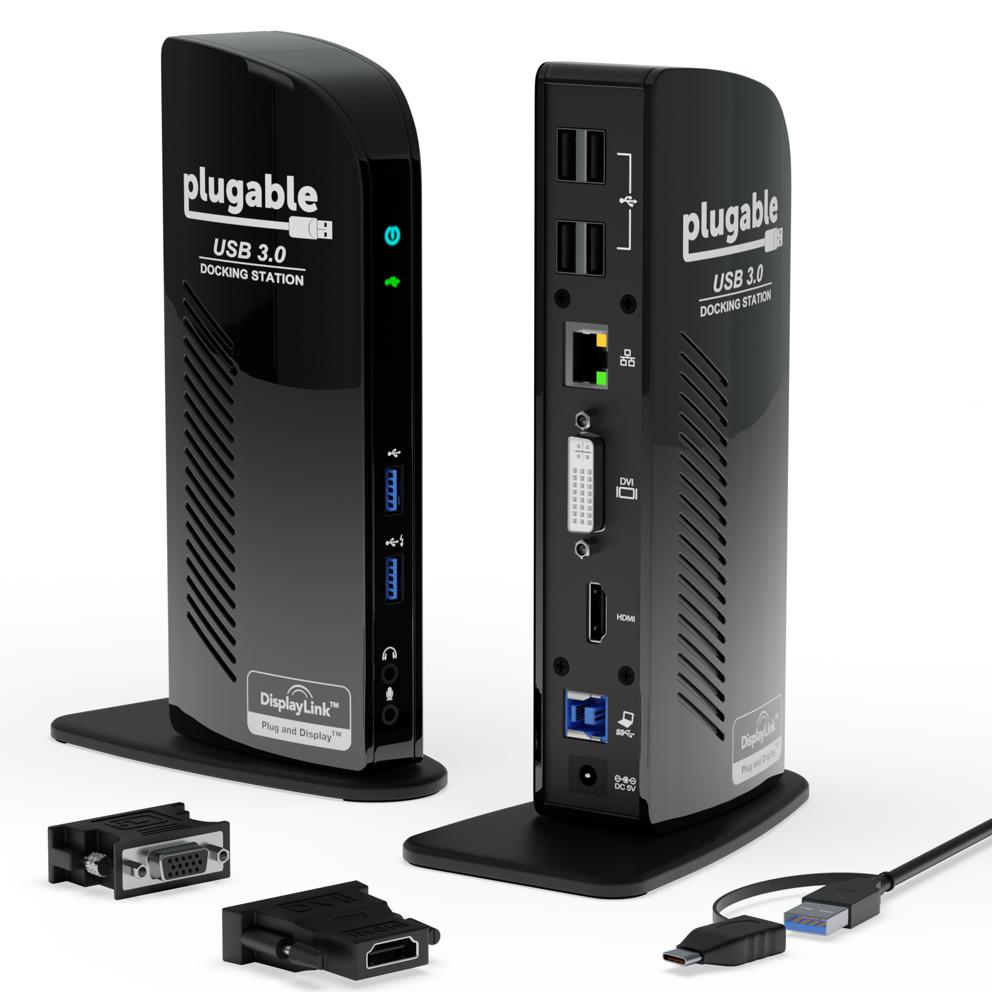
Plugable Ud
The budget pick — a long-standing best-seller focused on essentials (dual video via DisplayLink, USB ports, Ethernet, audio) at a low price, working across a very wide range of laptops including older ones and non-video USB-C ports. DisplayLink video is less smooth and it usually won't charge your laptop, but unbeatable for affordable, broadly-compatible basic docking.
The Plugable UD-3900 is the budget pick and a long-standing best-seller for basic, dependable docking. It focuses on essentials — dual video outputs (HDMI and DVI/VGA via DisplayLink), several USB ports, Ethernet, and audio — at a low price. Because it often uses DisplayLink (software-driven video) rather than native video, it works across a very wide range of laptops, including older ones and those whose USB-C ports don't support video output, making it a versatile budget solution. The trade-offs: DisplayLink video isn't as smooth or low-latency as native output (fine for productivity, less ideal for gaming or video), and it generally doesn't charge your laptop. But for affordable, broadly-compatible basic docking — adding monitors, Ethernet, and USB to almost any laptop cheaply — it's the value standout that has worked for countless setups.
Pros
- ✓Low price; long-standing reliable best-seller
- ✓Works with a very wide range of laptops (incl. older)
- ✓Adds dual displays, Ethernet, and USB via DisplayLink
- ✓Versatile compatibility
Cons
- ✗DisplayLink video less smooth than native
- ✗Usually doesn't charge the laptop

Belkin Thunderbolt 4 Dock
The premium alternative — flagship Thunderbolt 4 performance, a good port selection, high charging power, and dual-4K support from a trusted, well-supported brand. Fewer total ports than the CalDigit, but an excellent reliable Thunderbolt 4 dock, strong for Mac and mixed fleets.
The Belkin Thunderbolt 4 Dock is the premium alternative for flagship Thunderbolt 4 performance from a major, well-supported brand. It offers strong Thunderbolt 4 connectivity, a good selection of ports (Thunderbolt/USB-C, USB-A, Ethernet, display outputs), high power delivery to charge laptops, and dual-4K support, in a clean, reliable, well-built package. Belkin's scale means broad availability and solid support, and it's a frequent enterprise and Mac-user choice. It has fewer total ports than the port-stuffed CalDigit TS4 (so you may occasionally need an extra adapter), but for a premium, reliable Thunderbolt 4 dock from a trusted brand, it's an excellent CalDigit alternative — especially if you value Belkin's support and don't need the absolute maximum port count.
Pros
- ✓Flagship Thunderbolt 4 performance
- ✓High charging power and dual-4K support
- ✓Trusted brand with broad support
- ✓Clean, reliable build
Cons
- ✗Fewer total ports than the CalDigit
- ✗Premium price; needs Thunderbolt/USB4
Which one is right for you?
For a serious multi-monitor power-user desk
Caldigit Ts4
The most ports of any Thunderbolt dock, 98W charging, dual-4K, and rock-solid reliability connect an entire demanding setup through one cable — the professional benchmark.
For premium Thunderbolt from a trusted brand
Belkin Thunderbolt 4 Dock
Flagship Thunderbolt 4 performance, high charging, and dual-4K support with Belkin's support make it an excellent reliable alternative, strong for Mac and mixed fleets.
For Dell laptops and business value
Dell Wd19s Dock
Seamless Dell compatibility, full charging, multi-display support, and corporate reliability at attractive prices make it the obvious dock for Dell owners and value business use.
For a USB-C laptop on a sensible budget
Anker 575 Usb C Dock
A capable USB-C dock with strong ports, laptop charging, and dual displays at a far lower price than Thunderbolt is the value sweet spot for typical setups.
For broad compatibility on the cheapest budget
Plugable Ud
DisplayLink video works with almost any laptop including older ones, adding dual monitors, Ethernet, and USB cheaply — the universally-compatible basic dock.
Top pick: CalDigit TS4
The CalDigit TS4 is the best docking station for most power users because it offers the most comprehensive port selection of any Thunderbolt dock, with rock-solid reliability. It's a Thunderbolt 4 dock with an enormous array of ports — multiple Thunderbolt/USB-C ports, many USB-A ports, 2.5 Gigabit Ethernet, SD and microSD card readers, audio in/out, and DisplayPort — so it connects essentially everything on your desk through one cable to your laptop. It delivers a high 98W of power to charge even power-hungry laptops while docked, supports dual 4K (or a single high-resolution) display setup, and CalDigit has a strong reputation for reliable, well-built docks that just work.
Its appeal is being the do-everything dock: the sheer port count means you rarely need additional hubs or adapters, the Thunderbolt 4 connection provides full bandwidth for fast external storage and multiple displays simultaneously, and the high power delivery means one cable both charges your laptop and connects your whole setup. For a serious desk setup — multiple monitors, fast storage, lots of peripherals, and a laptop that needs full charging power — it's the benchmark.
The honest caveats: it's a premium-priced dock, it requires a Thunderbolt (or Thunderbolt-compatible USB4) laptop to use its full capabilities, and its extensive feature set is more than someone with a single monitor and a couple of peripherals needs. But for the most complete, reliable, high-power Thunderbolt docking experience, the CalDigit TS4 is the standout that professionals consistently choose.
Premium alternative and the Dell ecosystem pick: Belkin Thunderbolt 4 and Dell WD19S
The Belkin Thunderbolt 4 Dock is the premium alternative to the CalDigit for someone who wants flagship Thunderbolt 4 performance from a major, well-supported brand. It offers strong Thunderbolt 4 connectivity, a good selection of ports (Thunderbolt/USB-C, USB-A, Ethernet, display outputs), high power delivery to charge laptops, and support for dual 4K displays, in a clean, reliable, well-built package. Belkin's scale means broad availability and solid support, and it's a frequent enterprise and Mac-user choice. It has fewer total ports than the port-stuffed CalDigit TS4 (so you may occasionally need an extra adapter), but for a premium, reliable Thunderbolt 4 dock from a trusted brand, it's an excellent choice and a strong CalDigit alternative.
The Dell WD19S is the pick for Dell laptop owners and the value-oriented business dock. While many docks use Thunderbolt or USB-C, the Dell WD19 series is designed to pair seamlessly with Dell business laptops (and works with other USB-C laptops too), offering a generous port selection, high power delivery in versions matched to Dell's laptops, dual or even triple display support depending on the model, and the rock-solid reliability and IT-friendliness that make it ubiquitous in corporate environments. It's frequently available at attractive prices (especially refurbished), making it a strong value for a capable business dock. It's the obvious pick if you have a Dell laptop and want guaranteed compatibility and full charging, or if you want a proven, affordable business-grade dock.
Choose between them by ecosystem. The Belkin wins as a premium, broadly-compatible Thunderbolt 4 dock from a trusted brand, strong for Mac and mixed fleets. The Dell WD19S wins for Dell laptop owners and value-focused business use with guaranteed compatibility. The Belkin is the premium universal Thunderbolt pick; the Dell the value business-and-Dell pick.
The mid-range USB-C and the budget picks: Anker 575 and Plugable UD-3900
The Anker 575 USB-C Dock is the mid-range value pick for someone who wants a capable, well-rounded dock without paying for Thunderbolt. It's a USB-C dock (not Thunderbolt, which keeps the cost down) with a strong port selection — multiple USB-A and USB-C ports, HDMI, Ethernet, SD card reader — and good power delivery to charge a laptop, supporting dual-monitor setups (with the usual USB-C display caveats). Anker is known for reliable, well-priced accessories, and the 575 hits a sweet spot of useful ports, charging, and dual-display support at a far lower price than the Thunderbolt docks. It's the pick for someone whose laptop uses USB-C (not necessarily Thunderbolt) and who wants a solid, affordable one-cable desk setup without flagship features or cost.
The Plugable UD-3900 is the budget pick and a long-standing best-seller for basic, dependable docking. It's typically a USB 3.0 (or USB-C) dock focused on the essentials — dual video outputs (HDMI and DVI/VGA via DisplayLink technology), several USB ports, Ethernet, and audio — at a low price. Crucially, because it often uses DisplayLink (a software-driven display technology) rather than native video, it works across a very wide range of laptops, including older ones and those whose USB-C ports don't support video output, making it a versatile budget solution. The trade-offs: DisplayLink video isn't as smooth or low-latency as native Thunderbolt/USB-C output (fine for productivity, less ideal for gaming or video), and it generally doesn't charge your laptop (you keep your laptop's own charger plugged in). But for affordable, broadly-compatible basic docking — adding monitors, Ethernet, and USB ports to almost any laptop cheaply — it's the value standout.
Choose between them by needs and budget. The Anker 575 wins as a capable, affordable USB-C dock with laptop charging and dual displays for modern USB-C laptops. The Plugable UD-3900 wins on the lowest price and the widest compatibility (including older laptops and non-video USB-C ports) via DisplayLink, accepting no charging and software-driven video. The Anker is the modern mid-range value; the Plugable the cheap, universally-compatible basic dock.
How to choose: Thunderbolt vs USB-C, power, displays, and ports
Understand Thunderbolt versus USB-C, because it's the biggest capability and cost divide. Thunderbolt 4 (and compatible USB4) docks (CalDigit TS4, Belkin) offer the highest bandwidth, supporting multiple high-resolution displays, fast external storage, and many peripherals simultaneously through one cable with full performance and reliability — but they require a Thunderbolt/USB4 laptop and cost more. Plain USB-C docks (Anker 575) are cheaper and work with any USB-C laptop that supports video output (DisplayPort Alt Mode), handling typical dual-monitor productivity setups well, but with less total bandwidth. DisplayLink docks (Plugable) use software-driven video to work with almost any laptop (even older ones and USB-C ports without video), at the cost of video smoothness. Match the dock type to your laptop's capabilities (check whether it has Thunderbolt, USB-C video, or neither) and your performance needs.
Check power delivery and display support against your specific laptop and monitors, because these are the two most common dock disappointments. Power delivery (measured in watts) is how much the dock charges your laptop over the single cable — a powerful laptop needs a high-wattage dock (90W+) to charge while working, while a dock with too little power will charge slowly or not keep up, forcing you to keep the laptop's own charger plugged in (the CalDigit's 98W and the Dell/Belkin's high outputs handle demanding laptops; lower-power docks suit ultrabooks). For displays, confirm the dock supports the number and resolution of monitors you want (single 4K, dual 4K, etc.) AND that your laptop can drive them — a laptop's own GPU and ports limit how many external displays it supports regardless of the dock, so check both. Verify your laptop's wattage need and external-display capability before buying.
Match the port selection to your peripherals and prioritise reliability. Count what you actually plug in — monitors, keyboard, mouse, webcam, headset, external drives, Ethernet, SD cards — and choose a dock with enough of the right ports (the port-stuffed CalDigit rarely leaves you wanting; budget docks may need an extra hub). Wired Ethernet is a genuine benefit of most docks for a stable connection. Above all, prioritise reliability: a flaky dock that randomly drops monitors, undercharges, or disconnects peripherals is a daily frustration, so favour brands with strong reliability reputations (CalDigit, Dell, Belkin, Anker, Plugable all qualify at their tiers) and read reviews specifically for stability complaints. Buy the dock type your laptop supports, with enough power and display support for your setup and the ports for your peripherals, and don't over-buy Thunderbolt capability a USB-C laptop can't use.