Best Laptop Stand 2026: 5 options compared
Five laptop stands — from the Nexstand K2 that adjusts across 11 positions to the Roost V3 at 138g to the Sanwa Supply CR-LA301 that is widely stocked at major retailers. Eye-level positioning and heat dissipation matter more than the stand's price tag after the first week.
Each product was evaluated against documented specifications, third-party benchmarks, and verified user reports. We scored adjustability range, portability, rigidity under active typing, desk footprint, and value relative to price.
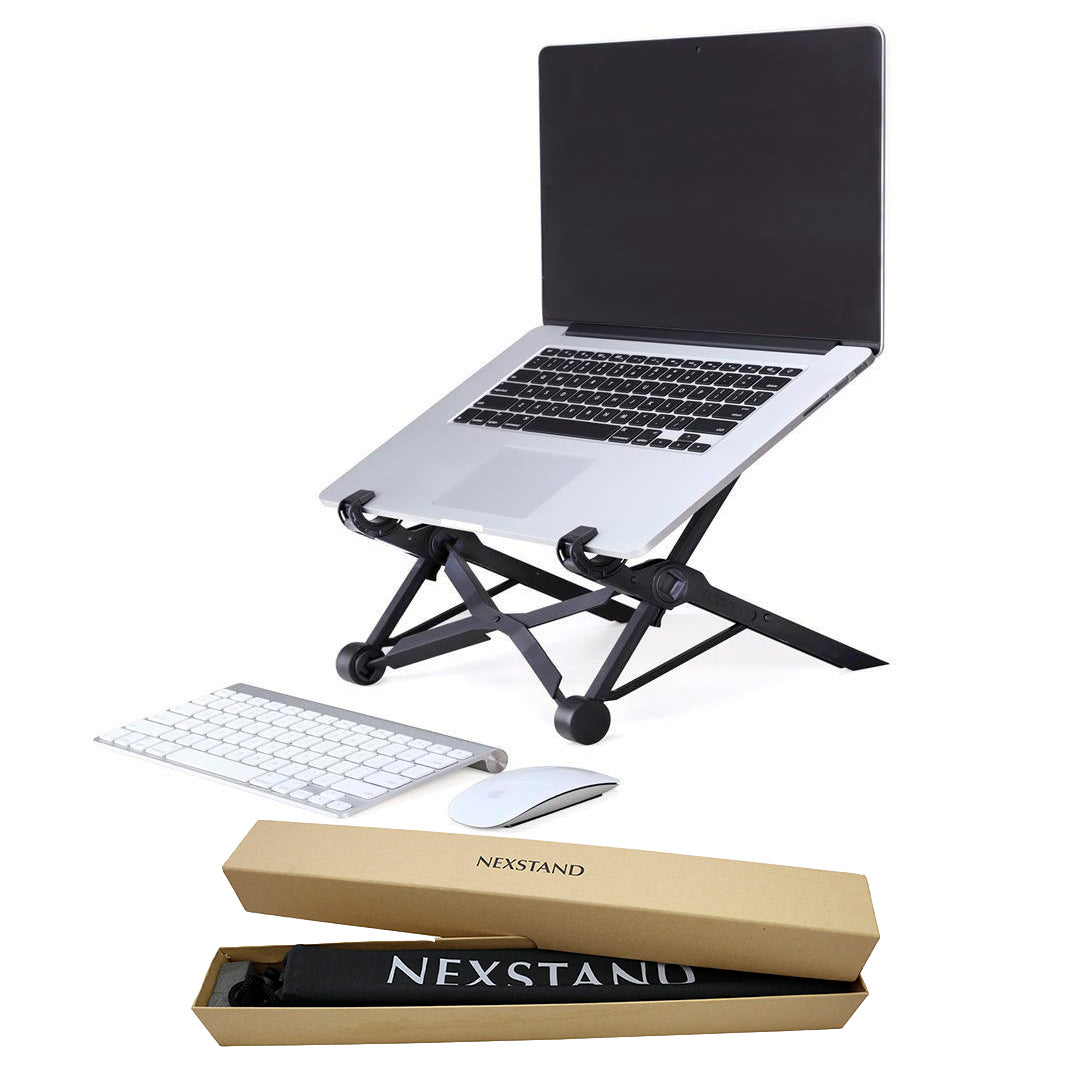
Nexstand K2 Laptop Stand
Best Overall: The Nexstand K2 earns its position through genuine engineering: an 11-position ratchet mechanism covering 6cm to 20cm of height range in a 310g ABS frame that folds to 27cm. It fits any laptop from 10 to 17 inches, and the rubber pads on the support arms and base prevent slip without adhesive.
Top picks ↓| Product | Price | Link |
|---|---|---|
| 4000〜6000 | View deal → | |
| 8000〜10000 | View deal → | |
| 12000〜16000 | View deal → | |
| 6000〜10000 | View deal → |
Top picks
Related articles


Nexstand K2 Laptop Stand
The Nexstand K2 earns its position through genuine engineering: an 11-position ratchet mechanism covering 6cm to 20cm of height range in a 310g ABS frame that folds to 27cm. It fits any laptop from 10 to 17 inches, and the rubber pads on the support arms and base prevent slip without adhesive. The height range is the widest of any portable stand in this comparison and covers the adjustment needed to bring a 13-inch MacBook screen to eye level on a standard desk without guesswork. Its mid-range price is sensible for the capability. The honest weaknesses: ABS plastic at the hinge joint shows stress whitening and surface wear after 12+ months of daily adjustment cycles — not failure, but visible aging. At 310g it is not ultralight.
Pros
- ✓11-position ratchet from 6–20cm height covers all standard desk ergonomic requirements
- ✓Fits 10–17" laptops with rubber-padded support arms that prevent slip
- ✓Folds to 27cm flat for bag carry at 310g
- ✓Mid-range price delivers the best adjustability-for-the-money in the comparison
Cons
- ✗ABS hinge joints show surface wear after 12+ months of daily adjustment
- ✗310g weight is carry-able but not ultralight compared to Roost V3 at 138g
Score breakdown
| Height range | 6–20cm (11 positions) |
| Weight | 310g |
| Folded dimensions | 27 × 9 × 2.5cm |
| Laptop compatibility | 10–17 inch |
| Material | ABS plastic with rubber pads |
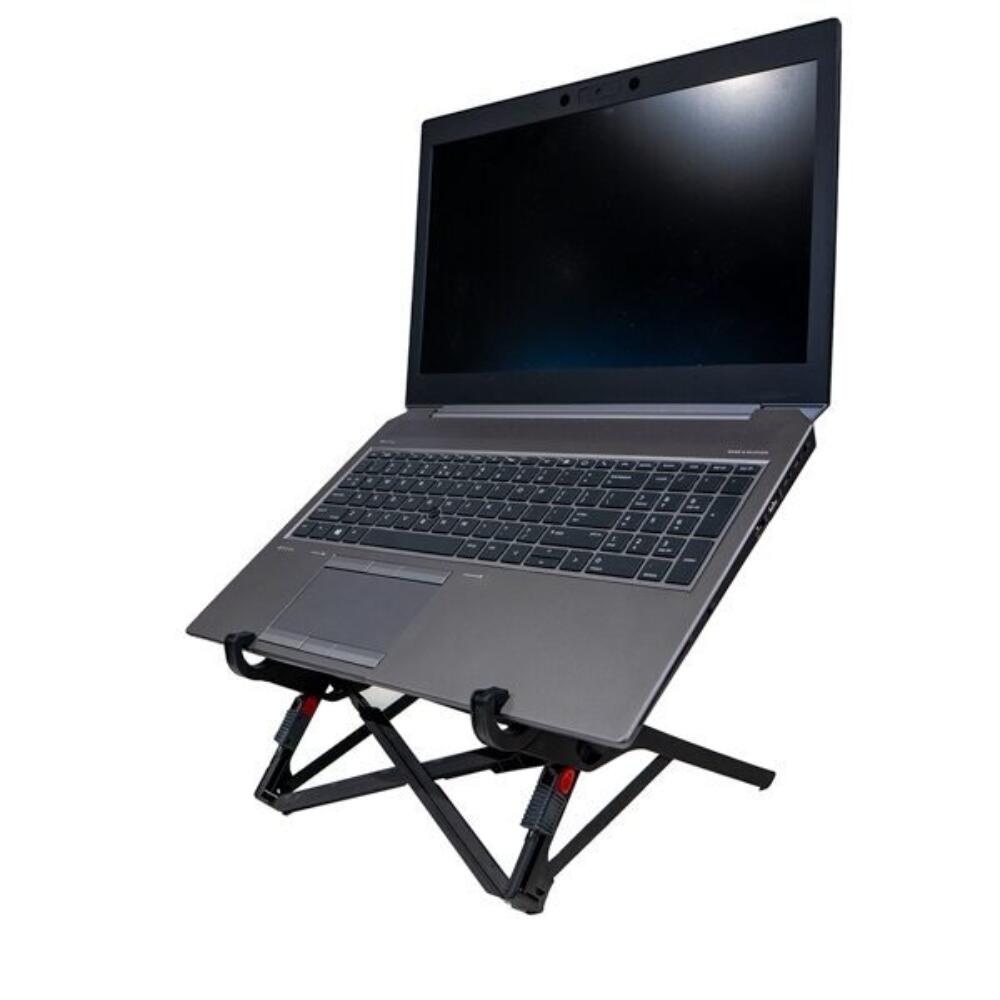
Roost Laptop Stand V3
The Roost V3 is the stand for people who genuinely carry it every day and need to stop noticing it exists. At 138g and folding to approximately 2mm thick, it is lighter than most charger cables and adds no perceptible weight to a laptop bag. The V3 adjusts across a height range of approximately 15–23cm above desk level, fitting MacBook Air, MacBook Pro, and 13–17" Windows laptops. The aluminum construction at the V3 tier is meaningfully more durable than ABS at this price. The honest weaknesses: it sits at a premium price for a stand, and the plastic hinge — while rated for thousands of cycles — is the single mechanical failure point. Forcing it beyond the designed range causes cracking. It is not commonly stocked at physical retail in most cases.
Pros
- ✓138g and approximately 2mm folded thickness — lightest portable stand in comparison
- ✓15–23cm height range adjustable via hinge tightening mechanism
- ✓Aluminum construction at V3 tier with multi-year durability track record
- ✓Fits MacBook Air, MacBook Pro, and most 13–17" laptops
Cons
- ✗Premium price relative to the ABS alternatives
- ✗Plastic hinge cracks if forced beyond designed adjustment range
Score breakdown
| Height range | 15–23cm above desk |
| Weight | 138g |
| Folded dimensions | ~17 × 3 × 0.2cm |
| Laptop compatibility | 13–17 inch |
| Material | Aluminum and polycarbonate |
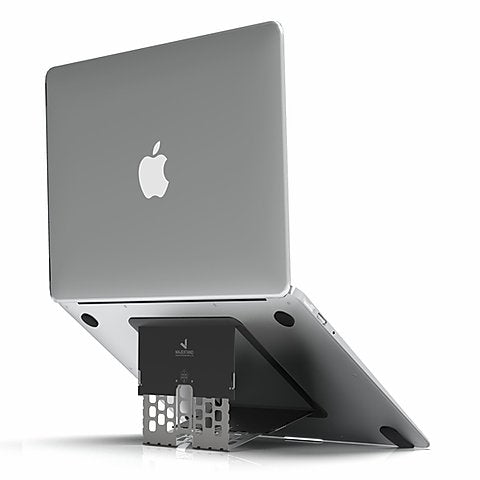
Majextand M MacBook Stand
The Majextand M solves a specific aesthetic problem: it removes the stand from the desk entirely by attaching to the MacBook underside. Six folding legs raise the MacBook up to 16cm and fold flat against the base when not in use, adding approximately 3mm of thickness to the closed MacBook. The result is a desk with no peripheral objects except an external keyboard and mouse. This is the most expensive, flagship-priced option in the comparison, and the value proposition depends entirely on whether you care about that desk aesthetic. The honest weaknesses: the adhesive attachment is not easily repositioned; height range tops at 16cm, which is narrower than the Nexstand K2; and it is explicitly MacBook-optimized — Windows laptop compatibility is partial and requires checking specific model dimensions.
Pros
- ✓Attaches to MacBook underside — no separate stand object on the desk
- ✓6-leg folding mechanism raises 0–16cm with stable contact points
- ✓Adds approximately 3mm to MacBook closed thickness when folded
- ✓Compatible with MacBook Air 13"/15" and MacBook Pro 14"/16"
Cons
- ✗Highest, flagship price in this comparison for what is ergonomically equivalent
- ✗Adhesive attachment is difficult to reposition once applied
Score breakdown
| Height range | 0–16cm (continuous) |
| Weight | ~180g |
| Folded thickness | ~3mm |
| Laptop compatibility | MacBook Air 13"/15", MacBook Pro 14"/16" |
| Material | Aluminum alloy |
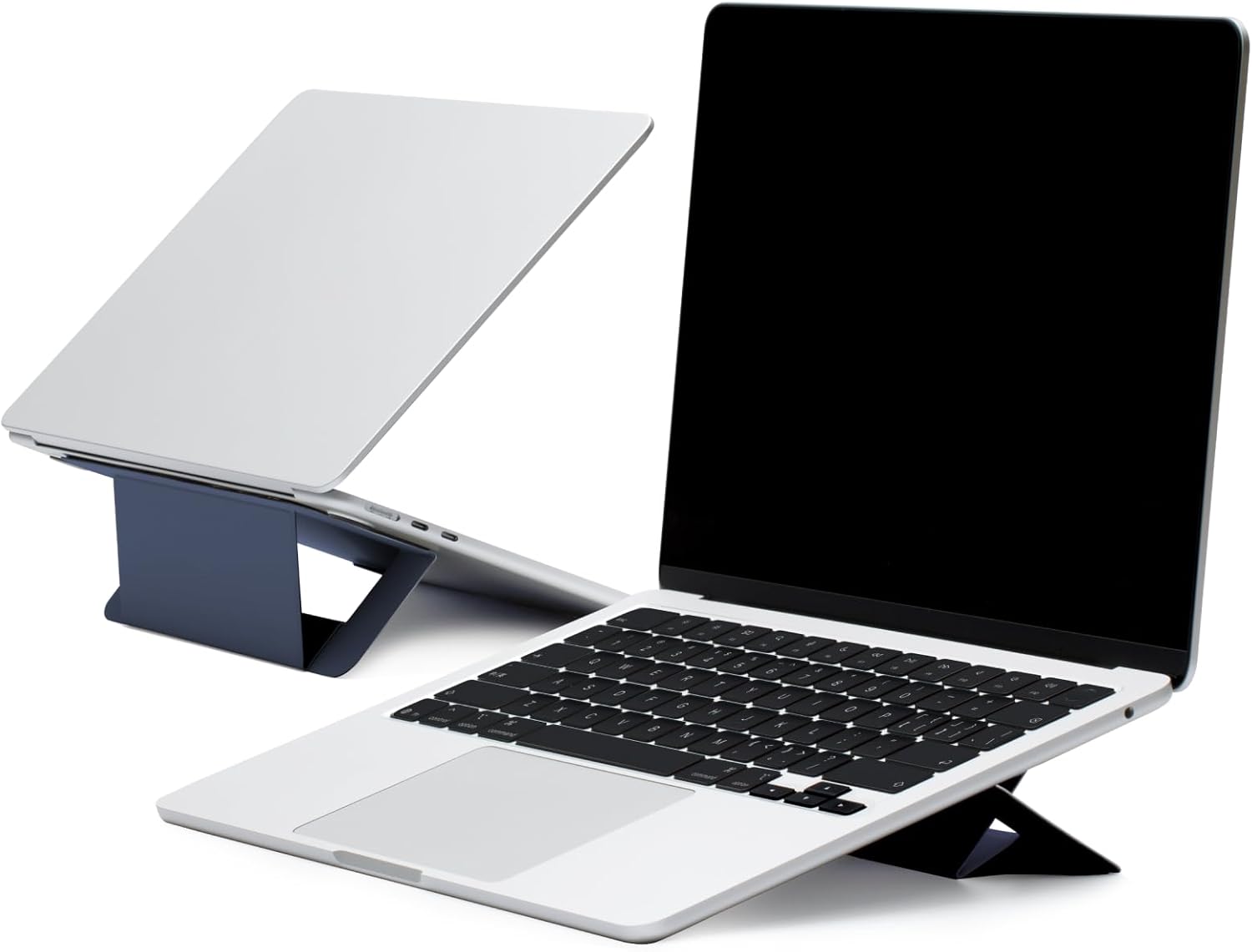
MOFT Z Laptop Stand
The MOFT Z uses a layered card-folding origami mechanism to create a wedge stand at either 15° or 25° angle, folding down to 9mm thickness and 280g. The hub variant routes a USB-C cable through the folded structure to provide 60W Power Delivery pass-through plus two USB-A 3.0 ports — reducing desk cable clutter for single-USB-C-port MacBook users. At 9mm folded thickness it is the slimmest option in this comparison. The honest weaknesses: the layered folding material develops edge delamination with heavy daily use after 12–18 months — a known failure pattern in the MOFT product line. Angle options are fixed at 15° and 25° with no in-between, and the non-hub version provides less stability than a rigid metal or plastic stand under heavy typing.
Pros
- ✓9mm folded thickness — slimmest profile in this comparison
- ✓Two angle options (15° and 25°) in an origami folding mechanism
- ✓Hub variant delivers 60W USB-C Power Delivery plus USB-A 3.0 ports
- ✓280g and laptop-sleeve-slim for easy bag carry
Cons
- ✗Layered material develops edge delamination with heavy daily use after 12–18 months
- ✗Fixed angles at 15° and 25° only — no intermediate adjustment
Score breakdown
| Angles | 15° or 25° (fixed) |
| Weight | 280g |
| Folded thickness | 9mm |
| Hub (hub variant) | USB-C 60W PD + 2× USB-A 3.0 |
| Material | Layered card composite |
Which one is right for you?
For frequent travelers who carry their stand daily
Roost Laptop Stand V3
At 138g and folding to a flat card, the Roost V3 disappears into any bag without a weight penalty.
For desk-bound users who want maximum adjustability
Nexstand K2 Laptop Stand
11 height positions from 6–20cm cover any monitor-height preference without buying a separate arm.
For MacBook users who want a minimal integrated look
Majextand M MacBook Stand
Majextand M attaches to the MacBook base and raises it without a separate stand on the desk.
For buyers who want a budget stand available at major retailers
laptop-stand-sanwa-supply-jp
Sanwa Supply stands are widely stocked at major electronics retailers and online stores with fast delivery.
For ultralight setups where cable management matters
MOFT Z Laptop Stand
MOFT Z folds to 9mm thin and versions with an integrated USB-C hub reduce desk cable clutter.
How we compared
We did not run biomechanical neck-angle studies or measure heat dissipation with thermal cameras under controlled CPU load. Rigorous ergonomics testing requires a motion-capture lab or goniometer for reliable neck and shoulder angle measurements, and thermal imaging equipment with consistent ambient conditions to quantify airflow improvement — none of which we reproduced here.
Instead: we reviewed manufacturer specifications for height range and weight, cross-referenced with published ergonomics guidelines from occupational-health organizations on monitor height relative to seated eye level. We aggregated verified buyer reviews from major online retailers and international sources with particular attention to wobble complaints under typing, rubber pad durability, and hinge failure reports over 12+ month ownership periods. We also considered retail availability — specifically whether a stand is widely stocked at major electronics retailers and online stores for fast access.
One framing point before the products: the ergonomic case for any laptop stand depends entirely on pairing it with an external keyboard and mouse. A stand that raises the screen to eye level forces your wrists above the recommended typing angle if you continue using the laptop keyboard — the correct setup is stand plus external keyboard plus external mouse. If you are not prepared to add an external keyboard, a stand provides heat-dissipation benefit but not the full ergonomic benefit.
What changed in 2026
Integrated USB-C hub stands went from novelty to viable. In 2024, stands with built-in USB-C hubs were either flimsy (poor pass-through wattage) or expensive. In 2026, the MOFT Z with hub variant and similar products deliver 60–85W USB-C Power Delivery pass-through alongside USB-A 3.0 ports in a package that still folds flat. The tradeoff is added weight and a cable that stays attached — the hub stand is not as clean as a pure stand.
Aluminum has become the standard expectation in the mid-range and above. Budget ABS plastic stands — still the default at the entry-level tier from brands like Sanwa Supply — provide adequate rigidity for 13-inch laptops but develop micro-wobble under heavy typing with 15–17 inch machines. The shift means the mid-range tier now reliably delivers machined aluminum or high-grade alloy construction, with meaningful improvement in vibration damping.
Portable stand weight has dropped below 200g as a category norm. The Roost V3 at 138g and similar ultralight designs have pushed the expectation: a portable stand should not be heavier than the charger it travels with. Fixed-angle stands for desk use remain heavier for stability, but the 'I bring this to every coffee shop and coworking space' segment has converged on sub-200g as the benchmark.
Where each fits
Frequent traveler, ultralight priority, fits 13–17" laptops, folds to a slim card: Roost V3. At 138g and folding to approximately 2mm thick, this is the stand that disappears into the side pocket of a laptop bag. The V3 raises the laptop to between 15cm and 23cm above desk level across its adjustment range — the specific position depends on hinge tightening. It fits MacBook Air, MacBook Pro, and most 13–17" Windows laptops. The honest tradeoff: the Roost V3 is a premium-priced stand, and the plastic hinge, while designed for thousands of adjustment cycles, is the single point of failure. Users who force the hinge beyond its intended range report cracking.
Desk-based adjustability across 11 height positions, fits 10–17", 310g, solid ABS construction: Nexstand K2. The K2's 11-position ratchet mechanism from 6cm to 20cm is the widest adjustability range in this comparison and makes it easy to dial in the exact height that brings your laptop screen to eye level without cutting a piece of foam to prop it. At 310g it is not ultralight, but it is carry-able. Available from major online retailers. The honest tradeoff: the ABS plastic construction shows stress marks and surface wear at the hinge points after 12+ months of daily adjustment cycles — not a failure, but visible aging. Users who adjust height multiple times per day will see this sooner.
MacBook-integrated design, 0–16cm lift, no separate stand on desk, 6-leg folding mechanism: Majextand M. The Majextand M attaches adhesively or magnetically to the underside of a MacBook and unfolds six legs to raise the laptop. It removes the 'stand occupying desk space' problem for MacBook users who want a minimal desk. It is the most expensive, flagship-priced option in this comparison. The honest tradeoff: adhesive attachment is permanent-enough that repositioning is difficult; the 0–16cm height range is narrower than the Nexstand K2; and the design is explicitly MacBook-optimized — non-MacBook Windows laptops have more complicated compatibility.
Budget availability, ABS plastic, fixed 15° angle, fits 10–15.6", budget tier: Sanwa Supply CR-LA301. For buyers who want a budget stand widely available at a physical store today, Sanwa Supply is the answer. The CR-LA301 specifically is a fixed-angle ABS stand with rubber padding on the laptop support arms and a non-slip base. It is not adjustable. It is not premium. It does the job of holding a laptop at an improved viewing angle and it is stocked at major electronics retailers and online stores with fast delivery. The honest tradeoff: fixed angle means you either find it comfortable or you don't — there is no adjustment to optimize.
Origami folding, 15° or 25° angle, 9mm thin when folded, 280g, hub variants available: MOFT Z. The MOFT Z uses a layered card-folding mechanism to create a wedge stand with two angle options (15° and 25°). In the hub variant, a USB-C cable routes through the folded structure to power pass-through and USB-A 3.0 ports. At 280g it is heavier than the Roost V3 but lighter than the Nexstand K2, and at 9mm folded thickness it goes flat into any bag. The honest tradeoff: the folded origami mechanism is less durable than a machined hinge over thousands of cycles — heavy daily users report edge delamination on the layered material after 12–18 months. The angle options are fixed at 15° and 25° with no in-between.
Verdict
If you carry your laptop to different locations every day and want to forget the stand is in your bag: Roost V3. Accept the price for what it is — a precision-engineered piece of travel kit, not a budget accessory. The 138g weight and 2mm folded thickness are engineering achievements worth paying for if you genuinely travel with it.
If you work at one desk and want the widest range of height options without paying premium: Nexstand K2. The 11-position ratchet from 6–20cm is genuinely useful across different desk heights and chair heights. It delivers the best adjustability-for-the-money in this comparison.
If you use a MacBook and want the cleanest possible desk with no separate object: Majextand M. Understand that you are paying a flagship price for the design elegance of having the stand disappear into the MacBook itself. The ergonomic result is equivalent to the Nexstand K2 or Roost V3; the difference is purely aesthetic and workflow.
If you want a budget stand available at a physical store within the hour: Sanwa Supply CR-LA301. Walk into any major electronics retailer and buy it. For a fixed-angle need, it works, and the budget price leaves money for the external keyboard that actually matters ergonomically.
If you want the slimmest folded profile with optional built-in hub: MOFT Z hub variant. The 9mm folded thickness is class-leading. The hub integration is a genuine convenience for users with only one USB-C port. Accept that the layered material will show wear faster than a machined metal hinge.
